Nov 19, 2026
Profiling a WebGPU game on an Android phone over Wi-Fi
Chrome on Android can be profiled over Wi-Fi, but macOS may refuse the connection with No route to host. A loopback relay, a charger and a cool phone fix it.
Question: How do you measure a browser game's frames on a real Android phone without a cable to the computer, and why does adb over Wi-Fi fail on a Mac with "No route to host"?
Short answer: Chrome on Android exposes its debugging protocol through adb, and adb can reach the phone over Wi-Fi after one command over the cable. On a Mac, Local Network privacy can refuse a terminal's programs the phone's address with no prompt at all. Programs that ship with macOS are not refused, so a small relay run by /usr/bin/python3 on the Mac's loopback carries adb across. Then keep the phone on a charger and start every run cool.
What that leaves open: The relay gets past the refusal but does not change it: any third-party program in that terminal still cannot reach the local network, and the cause was found by elimination, not in Apple's documentation. Wi-Fi also adds nothing a script can do with the phone's touch screen. By the end you can check the four commands that set the link up, the heat rule that decides whether a run counts, and what only a real player's session shows.
The game measured here is Day Hike, a co-op horror game that runs in your browser. This doc is how its frames are timed on a real Android phone with no cable to the computer. Play it in your browser, no install.
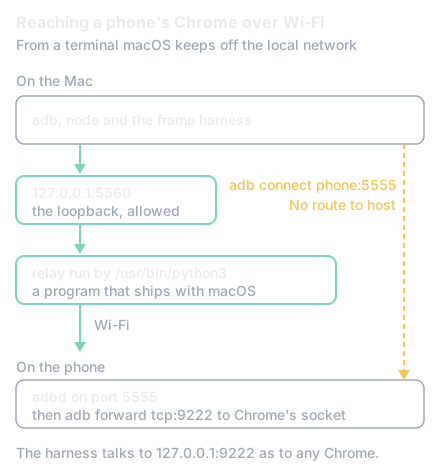
The figure is the path that works: follow the solid line through the loopback and the relay, and note that the straight dashed line is the one macOS refused.
In numbers:
- "No route to host" for adb and for node, and none for
/usr/bin/nc,perl,rubyor/usr/bin/python3to the same address (section 2). - Four commands after one
adb tcpip 5555over the cable, and the cable can be pulled (section 3). - 2.5 times slower: a fourth intro run straight after three others, so a run counts only from thermal status 0 and a battery at 34.5 °C or less (section 4).
- 0 frames at the 120 Hz spacing in a scripted walk of 1,507 frames, so a real player's tab is recorded over the same link (section 5).
This section describes Day Hike's phone harness as of Nov 19, 2026, timing the game on a Pixel 9 (Chrome, Android, a Mali-G715 GPU). Over a USB cable the first step is the documented one: forward a port on the computer to Chrome's debugging socket on the phone, adb forward tcp:9222 localabstract:chrome_devtools_remote, and http://localhost:9222/json lists the phone's tabs [1]. From there the harness speaks Chrome's debugging protocol as it would to a desktop Chrome: it opens a tab, waits for the game's world, and times frames in consecutive 10 second windows.
The first trap is that a Chrome in the background does not answer on that socket. The forward succeeds and the requests hang. So before it attaches, the harness wakes the screen (input keyevent KEYCODE_WAKEUP), keeps it on while the phone is powered (svc power stayon true) and opens the game in Chrome in front with am start, all through adb shell. It also checks that the browser on the port says Android in its user agent and refuses to run otherwise, since a reading taken on the wrong machine looks exactly like a right one.
The cable works, but it ties the phone to the desk: a phone on a cable to the computer is not one a player holds and plays. That is what Wi-Fi was for, and where the second trap was.
Android's documented way to adb over Wi-Fi from an older setup is to put the phone's adb daemon on a port over the cable, adb tcpip 5555, and then adb connect <phone address>:5555 [2]. On the Mac the connect failed with "No route to host". A short script in node failed the same way to the same address, so it was not adb.
Since macOS 15, an app must be allowed before it reaches devices on the local network, and macOS asks the user the first time [3]. The ask goes to the app the system holds responsible for the connection. The terminal in use started its shells from a background agent (launchd), so each process was its own responsible process: no prompt was ever shown, no rule for adb or node existed in the system's network settings, and every connection to a local address came back as EHOSTUNREACH, which is the "No route to host" adb printed.
The way past it came from testing which programs were refused. /usr/bin/nc, /usr/bin/perl, /usr/bin/ruby and /usr/bin/python3 all reached the phone's address from the same terminal: the programs that ship with macOS were not held to the rule. A Homebrew or pyenv Python was refused like adb. And the Mac's own loopback, 127.0.0.1, is not the local network, so nothing was refused there.
So the fix is a relay: one small Python file, run by the system's own interpreter, that listens on 127.0.0.1:5560 and carries each connection to the phone's port 5555, copying bytes both ways with no buffering delay (TCP_NODELAY) and keep-alives on. adb connects to the loopback, which it may, and the relay makes the connection macOS allows it to make. The whole setup is one command over the cable and four after it:
adb tcpip 5555                                     # once, over the cable
/usr/bin/python3 wifi-relay.py <phone address> &   # the phone's address: adb shell ip -f inet addr show wlan0
adb connect 127.0.0.1:5560
export ANDROID_SERIAL=127.0.0.1:5560               # every later adb call uses the Wi-Fi link
adb forward tcp:9222 localabstract:chrome_devtools_remote
The cable can then be pulled, and the harness runs unchanged: it talks to 127.0.0.1:9222 as before. The phone's port stays open until the phone restarts, and adb usb closes it when the work is done. The relay is in the game's public repository as tools/frame-budget/wifi-relay.py.
Takeaway: if adb, node or any third-party tool gets "No route to host" to a device on your network from a Mac terminal, and the same address works from another machine, test
/usr/bin/ncto it. If nc connects, the block is Local Network privacy, and a relay run by a system binary is a way past it that changes no setting.
Off the cable the phone needs power from somewhere else. svc power stayon true holds the screen on only while the phone is powered; on its battery the screen times out, the phone locks, Chrome leaves the front, and the run ends mid-window. The phone stays on a charger. On a charger with its screen held on it also gets warm, which is the next problem.
A phone throttles itself as it warms, and Android reports how far along it is as a thermal status: 0 for none, 1 for light throttling, up to 6 for shutdown [4]. The harness reads it with adb shell dumpsys thermalservice, and the battery's temperature with dumpsys battery, at the start and end of every run, and keeps both in the run's record.
It matters more than any change being measured. Three of the game's intro runs back to back warmed the Pixel 9 until a fourth ran about 2.5 times slower. On an earlier build, a walk that held 60 frames a second on the cool phone took 18 to 21 ms a frame at thermal status 1. A phone on a charger with its screen held on cools slowly, so the harness can wait before a run: it reads the phone every 15 seconds until the thermal status is 0 and the battery is at 34.5 °C or less, for up to 12 minutes, and records how long it waited and whether the run started cool. A run that warms the phone past status 1 is discarded, and two builds are compared in runs taken in turn rather than all of one and then all of the other.
The harness walks by sending touches to the game's on-screen stick through Chrome's debugging protocol, and turns the view with a second finger's swipe when the walker has been stuck for 3 seconds. The page sees those touches as real ones. The phone's touch screen does not see them at all: they never ask the display to go from 60 to 120 Hz, which a real thumb on a Pixel 9 does, and which made the game's walk uneven in a way no scripted walk showed (the previous part of this series: a scripted walk of 1,507 frames had no gap of 8.3 ms, the player's own walk had 451).
So the same Wi-Fi link is also used the other way round: the player plays on the phone in their hand, with sound and real touches, and a script attaches to their tab without reloading it and records every frame. That is the one measurement a scripted run cannot replace, and it needs the phone off the cable.
The rest of what a phone run is follows from measuring the phone as a player holds it: the phone's own screen size with no emulation (the game's canvas on its Low tier is 250 by 452 on the Pixel 9), whole frames rather than GPU timings, since the Mali GPU's timer reports the main pass alone, and a picture saved at each window's end beside the numbers, to see what was on screen when a number looks wrong.
What next
Open Day Hike in Chrome on an Android phone and walk with the stick. As of Nov 19, 2026, every frame figure the game reports for a phone came from the setup in sections 3 and 4; section 5 is what a script cannot reach, and why a real player's session is recorded too. Play it in your browser, no install.
- Is AWS, Azure or GCP cheapest for a T4 GPU, and does switching save time?
- Which cloud runs browser GPU benchmarks in parallel: AWS, GCP or Modal?
Part 4 of 4 in Browser game trapsPrevious: Why a phone game stutters only while you touch the screen
New research as it lands: the feed (RSS).
- [1]K. Basques and S. Emelianova, "Remote debug Android devices," Chrome for Developers. Accessed: Nov. 19, 2026. [Online]. Available: https://developer.chrome.com/docs/devtools/remote-debugging
- [2]Android Developers, "Android Debug Bridge (adb)," Android Developers. Accessed: Nov. 19, 2026. [Online]. Available: https://developer.android.com/tools/adb
- [3]Apple, "TN3179: Understanding local network privacy," Apple Developer Documentation. Accessed: Nov. 19, 2026. [Online]. Available: https://developer.apple.com/documentation/technotes/tn3179-understanding-local-network-privacy
- [4]Android Developers, "PowerManager," Android Developers. Accessed: Nov. 19, 2026. [Online]. Available: https://developer.android.com/reference/android/os/PowerManager#getCurrentThermalStatus()