Oct 22, 2026 · Updated Oct 24, 2026
Parallel GPU browser rigs: AWS, GCP and Modal
Ten stopped AWS Windows GPU machines run a round of browser GPU benchmarks in under two hours; GCP allows one GPU, and Modal's Chrome falls back to software.
Question: A round of browser GPU benchmarks is 10 to 20 experiments, each about 25 minutes of page loads on one real GPU, and it took 4 to 8 hours on one rented machine. Which cloud runs it in parallel fastest, with numbers that still mean something, and what does it cost?
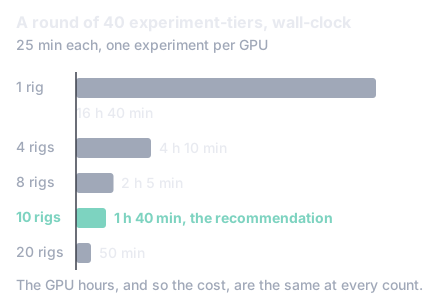
Short answer: N copies of the same AWS Windows GPU machine, kept stopped between rounds and driven over a self-healing tunnel, one experiment each. A stopped copy is under a minute from its start call to a browser answering over the Chrome DevTools Protocol: the debugging socket a test harness uses to drive a remote Chrome, load pages and read their timings. port, the account allows 192 of them, the numbers match the original machine's calibration, and ten copies cut a 40-experiment round from 16 h 40 min to 1 h 40 min for the same GPU hours. Modal's containers start in seconds, but Chrome's The layer inside Chrome that turns the browser's graphics calls into Vulkan, Direct3D or OpenGL calls for the GPU driver. cannot open the GPU under its A sandbox that runs containers on its own reimplementation of the Linux kernel; Modal runs GPU containers in it, with NVIDIA's driver reached through a proxy. sandbox, so the browser falls back to a software renderer. GCP allows one GPU per project without a quota request, and a Linux rig works but measures frame times differently.
In numbers:
- Under a minute from a stopped Windows GPU machine's start call to Chrome answering, on AWS and GCP alike, against about ten minutes for a fresh one (section 3).
- 33.2 to 33.6 ms a frame on a scratch copy of the rig, against the 33.17 ms the budgets were calibrated on, so copies need no re-calibration (section 4).
- 192 machines allowed on AWS, 1 GPU on GCP, 10 GPUs on Modal (section 6).
- $0.30 an experiment-tier and $11.9 a 40-experiment round on AWS Windows, at any number of machines (section 8).
- Both tunnels failed together when the machine's CPU starved, which is why the forward now watches itself and the queue retries a dropped run (section 7).
The worked example is Day Hike, a first-person hiking game in the browser, and its
frame-budget harness: an experiment compares two builds at one quality tier over four views,
three pairs, two sides, so 24 page loads of about a minute each, strictly one after another
on one Chrome, about 25 minutes an experiment-tier. A round is 10 to 20 experiments, often at
both tiers. As of Oct 22, 2026, a round ran on one rented Windows machine, an AWS
g4dn.xlarge with one NVIDIA T4 and 4 vCPUs [1], driven from a MacBook Air through a Session
Manager port forward: 4 to 8 hours of waiting, lengthened by a cold start of about ten
minutes and a forward that died after some tens of minutes with the harness hanging on it.
This doc measures, on Oct 22 and 23, 2026 (UTC), what the alternatives actually do, on
scratch machines made and destroyed for the purpose: the time from "start" to the first
measured page, fresh, from a prepared image and from a stopped machine; how many browsers
can run at once and what the quotas allow; whether the measurement is valid there (a real
GPU under WebGPU, timestamp-query available, the game's per-pass readout answering); how
the tunnels hold up; and what an experiment-tier and a round cost. The harness stays on the
laptop, driving remote browsers: no option measured here gave a reason to change that shape.
The rule that shapes everything: One experiment per GPU. Several Chromes on one machine share its GPU and time each other, so parallelism is machines (or containers with a GPU each), each with one Chrome on one forwarded port.
Every machine below was a scratch copy, launched with the same images, start-up scripts,
network and identity the game's Terraform roots use, tagged apart from the real rig, and
destroyed at the end. Chrome was started as the rig's own start script starts it and reached
through a forward; the first page was the forest view at the high tier from a preview build,
with ?gpuTime, waited for the world to be ready, settled, and its frames and readout taken
as the harness takes them. Times are wall-clock from the launch, stop or start call on the
laptop.
| Option | What ran |
|---|---|
| AWS Windows | g4dn.xlarge (T4), us-east-1a, the public Windows Server 2025 image, the rig module's own set-up script as user data, Chrome 156 |
| AWS Linux | g4dn.xlarge (T4), us-east-1a, AWS's "Deep Learning Base OSS Nvidia Driver GPU AMI (Ubuntu 24.04)" (driver 595.91 preinstalled), Chrome 156 headless on Vulkan, as a systemd service |
| GCP Windows | g2-standard-4 with nvidia-l4-vws (L4), the GCP module's start-up script, Windows Server 2025, Chrome 156; in us-central1-a, because every zone of us-west1 refused the L4 and the T4 with a stock-out |
| Modal | T4 and L4 containers from debian_slim with Chrome 156, the NVIDIA driver 610.57 injected by Modal, modal.forward for the tunnel [2] |
| AWS Windows (T4) | GCP Windows (L4) | AWS Linux (T4) | Modal (T4) | |
|---|---|---|---|---|
| Launch call to the machine running | 8 s | 25 s (the create call itself; 13 s from an image) | 2 s to launched, running within seconds | container up in 5 s (image cached) |
| … to the OS reachable | 70 s (Session Manager online) | 163 s (Windows specialised), 182 s (SSH over IAP) | about 60 s (Session Manager online) | 5 s |
| … to the set-up finished (driver, Chrome) | 613 s | 624 s | 141 s (Chrome and the Vulkan loader installed; the driver was in the image) | 41 s to build the image once, then nothing |
| … to Chrome answering on 9222 | about 660 s (started by hand; a fresh profile's first start takes longer than the script's 8 s wait) | 649 s | 141 s | 1 s (but see section 5) |
| From a prepared image to Chrome answering | 355 s from an image taken without Sysprep; 467 s from a Sysprep image (Session Manager online 376 s, password written 444 s, Chrome started at logon 467 s) | 55 s (create 13 s, SSH 40 s, Chrome 55 s) | not measured: the image was still being made when the research ended; about a minute expected (the 20 s boot plus cloud-init's first-boot work) | not applicable |
| Stopped machine started to Chrome answering | about 45 s (running 9 s, Session Manager 25 s, Chrome's logon task 20 s after the start) | 66 s (started 25 s, SSH 56 s, Chrome 66 s) | 20 s (running 9 s, userspace 18 s, Chrome's service listening 20 s after the start call) | not applicable: a container is new every time |
| Stopping the machine | 6 min 37 s | 27 s (and 43 s) | 6 min 44 s | 0 |
| Making the image | 34 min 12 s (a 50 GB Windows volume's first snapshot) | 6 min 38 s | over 15 minutes (the 80 GB snapshot was at 17 % after 14 min when the research ended) | the image build, 41 s |
| Forward up, from the call | 3 to 4 s (Session Manager), 3 s (SSH over Session Manager) | 3 s (SSH over IAP) | 3 s | not reached |
| First page ready after the canvas | 34 to 36 s | 36 s | 22 to 24 s | not reached |
Three things stand out.
- A Windows machine from the public image is ten minutes to Chrome on either cloud, as the rig itself is; the set-up (the GRID driver, Amazon DCV, Chrome, Node, Git) is seven of them.
- A stopped, set-up Windows machine is under a minute to Chrome on either cloud once Chrome starts itself at the desktop user's logon, through a logon trigger on its scheduled task. Without the trigger, something has to start Chrome remotely after every boot.
- The AWS cost is at the stop and the image, not the start. Stopping either AWS machine, Windows or Linux, took close to seven minutes that evening, and the Windows image took 34 minutes to become available. GCP stops in half a minute and images in seven. Neither is on a round's critical path if the machines are stopped, not destroyed, between rounds: a stop is the end of the evening, and an image is made once.
A Windows image needs Sysprep for AWS's GRID driver to work on the machines started from it [3], and Sysprep makes a copy's first boot run a specialize pass and a reboot before the logon: 467 s to Chrome instead of 355 s. That is paid once, when a copy is created; every later start is the stopped machine's, under a minute. A snapshot after a volume's first is incremental: later images of the same rig took under four minutes each.
Takeaway: an AWS snapshot was slow on every attempt that evening (the Windows image 34 minutes, the Linux one not finished in 15). An image is made once and is not on a round's path, but it is not something to make on the evening it is needed.
The adapter the page sees, whether timestamp-query is offered and the readout answers, and
the same view's numbers side by side (forest, high tier, 1512 by 982, the same build, each row
one sample, two where two were taken, settled 30 s unless said otherwise):
| AWS Windows T4 (D3D12) | AWS Linux T4 (Vulkan, headless) | GCP Windows L4 (D3D12) | Modal T4 | |
|---|---|---|---|---|
| Adapter the page reports | NVIDIA Tesla T4 | nvidia, turing, 0x1eb8, "Tesla T4" |
NVIDIA L4 | SwiftShader (software): invalid |
timestamp-query |
yes | yes | yes | yes, but on SwiftShader |
| Per-pass readout answers | yes | yes, with ?engine=webgpu (below); no without it |
yes | no |
| Frame mean, ms | 33.6, 33.2 | 24.5, 29.5 | 13.9 (settled 10 s) | not measured |
| Frame p95, ms | 51.0, 50.3 | 47.2, 45.4 | 51.9 | |
| Depth prepass, ms | 11.3 (settled 10 s) | 10.3, 10.5 (settled 10 s) | 7.1 (settled 10 s) | |
| Sun shadow map, ms | 3.2 | 3.3, 3.4 | 3.1 | |
| Whole-frame GPU time | null (Chrome removed writeTimestamp on D3D12) |
15.1 ms (it answers on Vulkan) | null |
Windows gives what the budgets were calibrated on. The AWS scratch machine is the rig over again (the same image, script, size and driver), and its forest/high mean of 33.2 to 33.6 ms sits where the rig's calibration row for the view did (33.17 ms on Oct 21, 2026, two days of optimisations earlier, so the agreement is a sign, not a proof). A copy of the rig is the same instrument, so copies need no re-calibration. The GCP L4 is a different GPU (about 2.3 times the T4 on this view) and would need its own calibration; so would the Linux machine.
Warning: the same view read 15.7 ms when its frames were taken 10 s after the world was ready instead of 30. The settle time is not optional.
Linux gives a real T4 under Vulkan, with two conditions. Headless Chrome on the NVIDIA
driver (--headless=new --use-angle=vulkan --enable-features=Vulkan, no display server)
reports the Tesla T4 with timestamp-query, and the game's per-pass readout answers with pass
costs within 10 % of the D3D12 machine's. The conditions:
- The game takes WebGPU only on macOS and Windows, so a Linux page lands on WebGL2 (the
readout then says it is unsupported and the frame is 43 ms).
?engine=webgpugoes past the platform check; the harness gained--engine webgpufor this, and the page's own adapter check still stands. - The harness refuses a remote Chrome whose user agent does not say Windows NT. Chrome on the Linux machine is started with a Windows user agent; that does not change the client hints' platform, which is why condition 1 is still needed.
What differs on Linux: the whole-frame counter works (15.1 ms here, where D3D12 gives null), and the requestAnimationFrame interval is lower and less steady than D3D12's on the same GPU (24.5 and 29.5 ms against 33.2 and 33.6) while the pass costs agree. So the frame-time side of a Linux rig's rows would be a different instrument from the Windows rig's: the pass costs carry across, the frame times and budgets do not.
Modal's container (gVisor, driver 610.57.04) shows the T4 to Vulkan. gVisor passes Vulkan
through its NVIDIA proxy only when the graphics capability is allowed [4], and here it is:
vulkaninfo lists the T4 with Vulkan 1.4, and a bare Vulkan program creates an instance with
every instance extension, a logical device with all 273 device extensions and every feature the
device reports, a queue from each of the five families, a pipeline cache, an image with device
memory, and reads a timestamp query pair back (32 ns apart). So the driver and the sandbox
allow what a browser's renderer does.
Where it stops: Chrome's GPU process does not get there. With the Vulkan flags, ANGLE's initialisation fails inside
vk_renderer.cpp(initialize:2530) withVK_ERROR_INITIALIZATION_FAILED, the GPU process exits (code 11) and restarts, and the page'srequestAdapter()never resolves.
With the sandbox flags relaxed or the GPU in-process, the error is the same; without the Vulkan
flags Chrome runs on SwiftShader and requestAdapter() answers with the software adapter.
Chrome 156 with the identical flags on the AWS Linux machine (a real kernel, driver 595.91)
initialises ANGLE on Vulkan and renders the game on the T4, so the difference is the sandbox or
the injected driver, not the flags.
The flag sets tried, each on a page that asks for the adapter: --use-angle=vulkan --enable-features=Vulkan; the same with --disable-gpu-sandbox, with --in-process-gpu, with
--disable-gpu-driver-bug-workarounds --use-vulkan=native, and with only NVIDIA's ICD visible
(VK_ICD_FILENAMES); --use-angle=gl-egl; --use-angle=swiftshader with Dawn left to find the
device itself (it did not); and the default. Nothing short of ANGLE itself says what the
failing call is. What would be tried next, in order:
- Chrome's own GPU log at
--vmodule=*vulkan*=3,*angle*=3on the GPU process. - A build of ANGLE's end-to-end tests (
angle_end2end_tests) in the container. - A question to Modal about ANGLE on their GPU proxy's allow-list.
Until one of those lands, Modal cannot measure the game. What it would give if it did: a
container up in 5 s with Chrome a second later, per-second billing ($0.59 an hour for a T4,
$0.80 an L4, $1.10 an A10 [5]), nothing while idle, and a tunnel (modal.forward(9222, unencrypted=True), a random public TCP port [2]) that ends with the function. A round of 40
experiment-tiers on 10 T4s would be about 1 h 40 min and $10.
| Machines at once | What limits it | Seen | |
|---|---|---|---|
AWS, g4dn.xlarge |
192 in us-east-1 (768 on-demand G vCPUs, 4 a machine); Spot G is 0 |
the quota | three scratch machines side by side, no refusal |
| GCP | 1 GPU in the whole project (the global GPU quota is 1; each type's regional quota is also 1) | the quota, and stock-outs | a second L4 machine refused with "Quota GPUS_ALL_REGIONS exceeded. Limit: 1.0 globally"; us-west1-a, -b and -c refused both the L4 and the T4 with a stock-out before us-central1-a had one |
| Modal | 10 GPUs at once on the Starter plan | the plan | not exercised past one |
A new GCP project starts with one global GPU quota across all regions, and more is a request [6]: a form, and usually a day. The stock-outs are the deeper problem for a fleet that must come up together on a given evening. Modal's Starter plan caps GPU concurrency at 10, with $30 a month of credit [5]. AWS had no such trouble.
| Tunnel | Up in | Lifetime seen | Notes |
|---|---|---|---|
| Session Manager port forward | 3 to 4 s | 31 min idle (a request every 15 s), then refused new connections for about two minutes while the machine was saturated (below), the connection already open living through it | Hung twice when opened within seconds of the agent coming online after a start (the session started, the port never passed a connection), once on Windows and once on Linux; a second forward opened in 2 to 3 s each time. An idle forward outlived Session Manager's default 20-minute idle timeout. |
SSH over Session Manager (ssh -N -L, ServerAliveInterval 15) |
3 s | 32 min idle, then dropped in the same saturation | Needs OpenSSH Server on the machine (about a minute to add on Windows). Still no inbound rule: the SSH runs inside the Session Manager session. No better than the plain forward when the agent starves. |
| SSH over IAP (GCP) | 3 s | the length of a run | Died on the first attempt after a restart (the machine was not accepting SSH yet); a retry loop is needed around it. |
Modal forward |
with the container | not reached |
Session Manager ends a session after 20 minutes without client input by default, settable from 1 to 60 [7]; no forward was seen to die idle.
Takeaway: what killed both tunnels at once was the machine, not the tunnel. After half an hour up, two game pages were opened through the two tunnels at the same moment, both on one Windows machine's Chrome: within a minute neither tunnel accepted a new connection, a remote command sent to the machine stayed pending, and both tunnels came back by themselves once the pages were closed.
Smaller and the same shape: with one page at a time, both tunnels refused new connections for about 20 s as the next page loaded, then answered again, the run through them unbroken. Both tunnels ride the same agent, and the agent is a process on a 4-vCPU machine whose Chrome is drawing an uncapped game; when it starves, every way in starves with it. One page at a time (the harness's own shape) did not do this in the time watched, but it is the likeliest reading of a forward that "dies after 20 to 50 minutes with the harness hanging": a long frame-bound page, the agent late, the session dropped. Two consequences for the design: never two pages on one machine, and a forward that watches itself.
So a dropped or hung tunnel is harmless in two ways. The forward script keeps a request going through the forward every 5 s and opens the session again when it ends or when Chrome has not answered through it for 30 s, which also covers the hang at a machine's start. And the queue puts a run whose Chrome went away back on the queue for any port to take, keeping the partial rows aside. A sample in flight is lost; the experiment is not. Resuming a run from its partial rows would save the sample as well, and is not built.
List prices, per second with a one-minute minimum, us-east-1 and us-central1:
| Running, an hour | An experiment-tier (25 min) | A round of 40 | Idle | |
|---|---|---|---|---|
AWS Windows g4dn.xlarge |
$0.715 (with the address) | $0.30 | $11.9 | stopped: $4.00 a month a machine for the disk; an image $1.25 to 1.75 a month |
AWS Linux g4dn.xlarge |
$0.531 | $0.22 | $8.9 | stopped: $6.40 a month (80 GB); or nothing, from the image |
GCP Windows g2-standard-4 + L4 vws |
$1.10 | $0.46 | $18.3 | stopped: $5.00 a month |
| Modal T4 | $0.59 (+ CPU and memory, about $0.07) | $0.27 | $11 | nothing |
The round's cost barely depends on how many machines run it: 40 jobs of 25 GPU-minutes are the same GPU time on 1 machine or 20. What changes is the wall-clock time, the start-up overhead (one boot a machine, under a minute from stopped, so under $0.02 a machine), and the disks kept while stopped. Eight stopped Windows rigs cost $32 a month in disks and run a 40-job round in about 2 h 5 min; twenty cost $80 a month and run it in under an hour. From an image instead of stopped disks, the disks cost nothing between rounds and each start costs a first boot: about eight minutes on AWS Windows from the Sysprep image [3], which is why stopped disks are the recommendation there, and under a minute on GCP.
Idle release: Modal bills nothing once the function ends. For the machines, a watchdog task shuts the machine down after 15 minutes without a connection to Chrome's port (a harness run holds one the whole time), so a rig forgotten after a round costs a quarter of an hour rather than the stop timer's hours. Tried on the GCP machine with a 3-minute limit and no client on its port, it shut itself down 3 min 13 s after the task was registered, and Compute Engine reported it stopped. Windows' own shutdown is what the rig's stop timer already relies on, so this is the same mechanism on a shorter, client-aware clock.
What this research cost, by the machines' running hours at list price: the two AWS Windows machines about 1.5 hours together ($1.10), the two Linux machines about 1 hour ($0.55), the two GCP machines about 0.8 hours ($0.90), Modal about 25 GPU-minutes of T4 across a dozen short runs ($0.30), and the snapshots, images and addresses for the hours they existed under $0.10: about $3, all of it destroyed at the end.
Recommendation: run the round on N copies of the AWS Windows rig, kept stopped between rounds, with a queue spreading the experiments over N forwards. It is the only option that is at once valid without re-calibration (the same T4, D3D12, image and script, frame times that match the calibration rows), allowed in numbers (192 machines against GCP's one and Modal's ten), and under a minute from stopped to Chrome.
The wall-clock of a round becomes the experiment-tiers times 25 minutes, divided by N:
| N rigs | A round of 40 experiment-tiers | Of 20 | Disks while stopped |
|---|---|---|---|
| 1 | 16 h 40 min | 8 h 20 min | $4 a month |
| 4 | 4 h 10 min | 2 h 5 min | $16 |
| 8 | 2 h 5 min | 1 h 15 min | $32 |
| 10 | 1 h 40 min | 50 min | $40 |
| 20 | 50 min | 25 min | $80 |
Ten is the practical number: a round in under two hours, $40 a month of disks that an image could replace, and a queue of forwards a laptop carries without effort (each harness is a CDP client, a few per cent of a core). The GPU hours are the same at any N.
Not recommended, and why:
- GCP as the fleet: one GPU per project without a quota request, and stock-outs in three zones on the one evening tried. Its Windows machine is otherwise the quickest of the three to stop, image and start, and the right place for a second GPU class (the L4) if one is wanted.
- Modal, as of Oct 22, 2026: the browser cannot reach the GPU. Worth the follow-ups in section 5, because a working Modal rig would be the fastest and cheapest of all.
- A Linux rig as the fleet: it starts in a minute from an image and costs a quarter less, but its frame times are another instrument (Vulkan, headless, a lower and less steady frame interval), so the budgets would be re-derived and the rows would not compare with the Windows rig's. It is the right second rig for a question about the Vulkan path, and it reads the whole-frame GPU time, which D3D12 does not.
As of Oct 24, 2026, the rig carries Chrome's logon trigger and the idle watchdog, and a Sysprep image of it is what every copy starts from: set up, with Chrome's trigger and the watchdog in place, so a copy needs no remote command to be ready.
Warning: Sysprep's answer file turns Remote Desktop back on in an image's first boot, before the start-up script runs. The script's step that closes it was a first-boot step an image never runs again, so every machine made from the image failed its own check ("Remote Desktop is on") on its first boot and was marked verified only on its second. Nothing was exposed meanwhile, since the security group admits no inbound connection.
Removing that step's marker before the Sysprep, as a second image tried, changed nothing, since the whole set-up block is skipped on an image. The fix is in the check's path: the start-up script closes the host again before its check whenever it finds Remote Desktop on. A rig replaced from the image with that script closed the host at 455 s and was verified at 484 s, Chrome up from the logon trigger, and the final image was made from that machine.
What remains, in order:
- On a round's day, raise the machine count to ten and start them; at the round's end, stop them. One forward per machine, and the round as a queue file.
- A Session Manager preferences document with the idle timeout at 60 minutes, if a forward is ever seen to die idle; none did here.
- The Modal follow-ups in section 5.
All of it is in the game's public repository.
- Copies of the rig in Terraform (
rig_count, 1 to 32): each copy is the first machine's start-up script rendered with its own password parameter, in the same subnet with the same identity, started and stopped with the rest, stopped by the same daily backstop. A copy made after an image is set starts from that image. Creating copies is refused while the machines are meant to be stopped, as a first machine's is, so no Windows machine is stopped during its first-boot set-up. - A queue over N ports (
tools/frame-budget/rig/chain.mjs): one worker per forwarded port, each job capped at its expected length plus ten minutes, a dropped run put back for any port, its partial rows kept aside, and a summary at the end. - A forward that watches itself (
tools/frame-budget/rig/forward.sh): a request through it every 5 s, and a new session when the old one ends or goes quiet for 30 s. - An idle watchdog (
tools/frame-budget/rig/idle-stop.ps1): a scheduled task that shuts the machine down after 15 minutes without a connection to Chrome's port, counting from each boot. - Chrome at logon (
tools/frame-budget/rig/start-chrome.ps1): the task that starts Chrome gained a logon trigger, so a started machine brings Chrome up by itself. - An engine override in the harness (
--engine webgpu), for a Linux rig. - A start-up script that closes the host again on a machine's first boot from an image (section 10).
Not built: Chrome's start as part of the start-up script itself (it stays the start script's, kept by the image), resuming a harness run from its partial rows, the Modal follow-ups, and a GCP quota request.
Keep reading
New research as it lands: the feed (RSS) or csarko.log.
- [1]Amazon Web Services, "Amazon EC2 G4 Instances," AWS. Accessed: Oct. 24, 2026. [Online]. Available: https://aws.amazon.com/ec2/instance-types/g4/
- [2]Modal Labs, "modal.forward," Modal documentation. Accessed: Oct. 24, 2026. [Online]. Available: https://modal.com/docs/reference/modal.forward
- [3]Amazon Web Services, "Install NVIDIA GRID drivers (G instance family)," Amazon EC2 User Guide. Accessed: Oct. 24, 2026. [Online]. Available: https://docs.aws.amazon.com/AWSEC2/latest/UserGuide/nvidia-GRID-driver.html
- [4]gVisor Authors, "GPU Support," gVisor documentation. Accessed: Oct. 24, 2026. [Online]. Available: https://gvisor.dev/docs/user_guide/gpu/
- [5]Modal Labs, "Pricing," Modal. Accessed: Oct. 24, 2026. [Online]. Available: https://modal.com/pricing
- [6]Google, "Allocation quotas," Compute Engine documentation. Accessed: Oct. 24, 2026. [Online]. Available: https://docs.cloud.google.com/compute/resource-usage
- [7]Amazon Web Services, "Specify an idle session timeout value," AWS Systems Manager User Guide. Accessed: Oct. 24, 2026. [Online]. Available: https://docs.aws.amazon.com/systems-manager/latest/userguide/session-preferences-timeout.html