Nov 19, 2026
Why a phone game stutters only while you touch the screen
A Pixel 9 runs its display at 120 Hz while a finger is on it. A game that draws every refresh then stutters; drawing every second refresh made it even.
Question: A WebGPU game holds 60 frames a second on a Pixel 9 in every scripted test, yet the player feels a slight pause at every step while walking with the touch stick. What causes it, and how do you fix it?
Short answer: The phone's display runs at 60 Hz until a finger touches it, then at 120 Hz. The browser asks the game for a frame at every refresh, and the phone cannot draw the game's world in 8.3 ms, so its frames land 8, 17 and 25 ms apart in turn and the walk moves unevenly while the thumb is down. Drawing frames a whole number of refreshes apart, picked from the display's measured rate (every second refresh at 120 Hz), keeps every frame the same time apart.
What that leaves open: The scripted walks never showed the problem, because a touch sent by a test tool does not make the display change rate; the evidence came from recording the real player's own tab. The after measurement is short, 5 seconds of steering, and rests partly on the player's verdict. By the end you can check the rule that picks how many refreshes to wait, and the way to record a player's tab without reloading it.
The game measured here is Day Hike, a co-op horror game that runs in your browser. This doc is why its walk felt uneven on a phone, and the pacing that fixed it. Play it in your browser, no install.
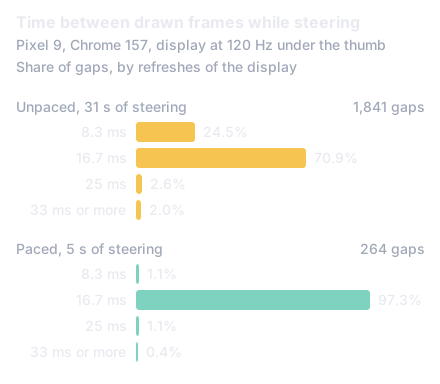
The figure shows the gaps between drawn frames while the player steered: look at the 8.3 ms bar, a quarter of all frames before the fix and almost none after.
In numbers:
- 451 of 1,841 gaps between frames were 8.3 ms while the player steered, against 0 in a scripted walk of 1,507 frames (section 1).
- 37 frames in 31 seconds came 33 to 67 ms late, and in 73 of the 84 slow frames the game's own code ran for less than the delay (section 2).
- 257 of 264 gaps were exactly 16.7 ms once the game drew every second refresh (section 3).
- N = ceil(rate / 60 - 0.3) refreshes between frames: every refresh at 60 to 75 Hz, every second at 90 and 120 Hz, every third at 144 Hz (section 4).
This section describes Day Hike as of Nov 19, 2026. The player reported that on their Pixel 9 the game "pauses slightly each step" while walking. The game's own frame-time harness had walked the same phone on the same build for 25 seconds and found nothing: 1,507 frames, the longest 16.8 ms, none over 20 ms. The game's frame clock was steady too, so the simulation and the camera were not the cause.
The harness drives the phone over Chrome's debugging protocol and walks by sending touch events to the page. So the next step was to record the player instead: attach to the tab they were already playing in, without reloading it, and log every frame while they walked for 40 seconds with sound on and their thumb on the stick.
That recording had what the harness never did. Of 1,841 gaps between the browser's frames, 451 were 8.3 ms, 1,306 were 16.7 ms, 47 were 25 ms and 37 were 33 ms or more. Every gap was a whole number of 8.3 ms steps, and the short ones fell only in the seconds when the player's thumb was down: in the seconds with no touch, there were none.
A gap of 8.3 ms is one refresh of a 120 Hz display. The phone's display settings confirmed it: Smooth Display was on, the peak refresh rate was unlimited and the display was rendering at 120 Hz. Android lets a display run at several rates and switch among them at run time [1], and the platform has a setting to change the rate when the screen is touched [2]. The browser asks a page for a frame once per refresh of the display, however fast it runs [3].
So while the thumb was down the browser asked Day Hike for 120 frames a second. The game's frame on this phone takes longer than 8.3 ms to make, so some frames came one refresh after the last, most two, some three. Each frame places the camera where the player should be at that moment, so the positions are right; what is wrong is when they are shown. A walk shown 8, 17 and 25 ms apart in turn reads as a walk that hesitates.
The slow frames were not the game's code. In 73 of the 84 frames that came more than 20 ms after the last, the game's own script ran for less than the delay, so the wait was in the browser's GPU side or the display, not in the page. The game already kept its simulation steady with a fixed 60 Hz step and drew the camera between the last two steps by the leftover fraction [4]. That makes each frame's picture right for its moment, but it cannot make the moments even.
The first fix was to draw at most 60 frames a second on a phone. The game's frame loop asks, at each refresh, whether a frame is due, and returns at once when it is not. At 120 Hz that draws every second refresh; at 60 Hz, every refresh. A refresh up to 2 ms early still counts, for the jitter in the times a display gives, and a frame that comes more than a frame late starts the pace again from itself, so nothing is drawn twice to catch up. Desktops draw every frame the browser asks for, as before.
The player played the paced build on the same phone and said it fixed the pause. The recording caught 5 seconds of their steering before they left the tab: of 264 gaps, 257 were 16.7 ms, three were 8.3 ms, three were 25 ms and one was 33 ms. None was longer. The display stayed at 120 Hz throughout; the game simply took every second refresh.
That rule holds a 60 or 120 Hz display. On a 90 Hz display it does not: a clock that waits for 16.7 ms between frames takes the second refresh (22 ms), then the next (11 ms), then the second again, so the frames are 11 and 22 ms apart in turn, which is the same unevenness at a different rate.
The rule that works at any rate is to measure the display and wait a whole number of refreshes. The game reads the refresh as the shortest of the last eight gaps between the browser's frames, leaving out any gap over 45 ms (a stall or a hidden tab). It takes the shortest because a busy page is not always asked at every refresh, so one gap may be two refreshes. Eight gaps at 120 Hz are a fifteenth of a second, so when the finger lifts and the display falls back to 60 Hz, the pace follows almost at once.
It then waits N refreshes between frames, the fewest that come to a sixtieth of a second, with three tenths of a refresh to spare: N = ceil(16.7 ms / refresh - 0.3). The spare keeps a refresh read a little short from costing one more, lets a 72 or 75 Hz display draw every refresh, and puts the points where N changes at 78, 138 and 198 Hz, rates no common display runs at. The table is what that gives on the rates a phone or a monitor commonly runs at; each row is tested with the times such a display gives, and only 60 and 120 Hz were played on a real phone.
| Display | Draws every | Frames a second |
|---|---|---|
| 60 Hz | refresh | 60 |
| 72 or 75 Hz | refresh | 72 or 75 |
| 90 Hz | second refresh | 45 |
| 120 Hz | second refresh | 60 |
| 144 Hz | third refresh | 48 |
| 165 Hz | third refresh | 55 |
| 240 Hz | fourth refresh | 60 |
A 90 Hz phone gets 45 even frames a second rather than 60 uneven ones. That is the trade: frames an equal time apart read as smooth at 45 a second, where frames 11 and 22 ms apart in turn did not at an average of 60.
The step that found the problem is the one to keep. With the phone on Wi-Fi debugging and Chrome's debugging port forwarded, a script lists the phone's tabs, waits for the game's page, connects to it and evaluates a small recorder in it: it wraps requestAnimationFrame so every frame the game asks for is logged with its timestamp and how long its callback ran, runs a frame loop of its own to log every refresh the browser gives, counts touch events per frame, and watches long animation frames. Nothing reloads and nothing on screen changes, so the player plays as they always do, sound and real touches included. The script starts logging a few seconds after the world is drawn, saves every 5 seconds, and reconnects if the tab is lost.
A test tool's touch events reach the page, not the phone's touch screen, so they never ask the display for a higher rate: the harness's walk saw a 60 Hz display from start to end. Any measurement of a phone game that drives input by script measures the phone at its resting rate. Record a real player's session at least once before trusting the scripted numbers.
What next
Open Day Hike on a phone with a fast display and walk with the stick. As of Nov 19, 2026, each frame the game draws is a whole number of the display's refreshes after the last, about 60 a second; section 4 is the rule that picks the number, and section 5 is how to see the problem on your own phone. Play it in your browser, no install.
- How do you profile a browser game on an Android phone over Wi-Fi?
- How do you generate a procedural world around the player without dropping frames?
- Is AWS, Azure or GCP cheapest for a T4 GPU, and does switching save time?
Part 3 of 4 in Browser game trapsPrevious: Pointer lock fails after Esc: an 8-byte fixNext: Profiling a WebGPU game on an Android phone over Wi-Fi
New research as it lands: the feed (RSS).
- [1]Android Developers, "Frame rate," Android Developers. Accessed: Nov. 19, 2026. [Online]. Available: https://developer.android.com/media/optimize/performance/frame-rate
- [2]Android Open Source Project, "Multiple refresh rate," Android Open Source Project. Accessed: Nov. 19, 2026. [Online]. Available: https://source.android.com/docs/core/graphics/multiple-refresh-rate
- [3]MDN contributors, "Window: requestAnimationFrame() method," MDN Web Docs. Accessed: Nov. 19, 2026. [Online]. Available: https://developer.mozilla.org/en-US/docs/Web/API/Window/requestAnimationFrame
- [4]G. Fiedler, "Fix Your Timestep!," Gaffer On Games, Jun. 2004. Accessed: Nov. 19, 2026. [Online]. Available: https://gafferongames.com/post/fix_your_timestep/