Nov 19, 2026
Streaming a procedural world in the browser
Generate a procedural world around the player in jobs that show whole, in a fixed slice of each frame ended by the clock. On a phone, slow frames fell 98%.
Question: A procedurally generated world has no map to load: its terrain, trees, grass and props are computed from a seed around the player as they move, and in an endless world that never stops. How should that generation be scheduled in a browser so the game holds its frame rate on any device, from a fast desktop to a cheap phone?
Short answer: Make every piece of generation a job that can stop and resume, and that shows its result in one step, whole or not at all. Give jobs a fixed share of every frame, 4 ms here, and end each piece of work by the clock rather than by a count of items, since a phone does the same work five to ten times slower than a desktop. When a job runs late, give it a larger share, not the whole frame. Build far enough ahead that the wait never shows.
What that leaves open: The design spreads work out; it does not make it cheaper, so a device too slow for the world's total generation still falls behind. Some work cannot be cut into small pieces at all, and the page's thread stays the bottleneck until part of it moves to a worker. By the end you can check the rules a scheduler like this needs, and how much one phone gained from them.
The game streamed here is Day Hike, a co-op horror game that runs in your browser. Its world is generated from a seed, and this doc is how that generation keeps up with the player as they walk, on a desktop and on a phone alike. Play it in your browser, no install.
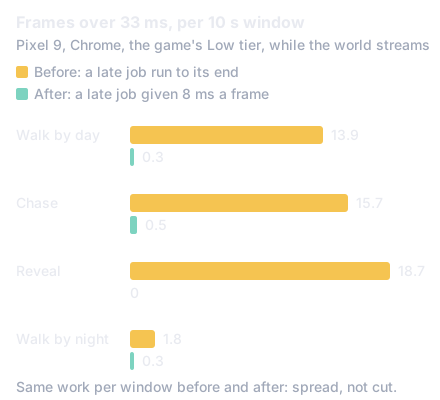
The figure is what the change did on the slowest device the game supports: look at how many frames took over 33 ms (two refreshes at 60 Hz) before and after, while the total streaming work stayed the same.
In numbers:
- 4 ms of each frame for streaming, in slices of 1.5 ms ended by the clock (section 4).
- 100 ms before a job is late, then 8 ms a frame for it, and 1 s before it runs to its end (section 5).
- 13.9 to 0.3 frames over 33 ms in a 10 second walk on a Pixel 9, with the longest frame 108 to 42 ms (section 7).
- 57% of the phone's busy main thread was evaluating the terrain's procedural noise, the part a worker could take (section 8).
This section describes Day Hike as of Nov 19, 2026. On a Pixel 9 the game held 60 frames a second standing still and missed frames only while the world streamed: in a trace of a night walk, 69 of the 70 missed frames had the page's main thread busy for more than a frame, while the GPU's own work took about 1 ms. The busy frames were the world being rebuilt around the player: a ring of terrain, a band of forest, a cell of grass and ground cover, each run to its end in one frame and taking 40 to 105 ms of it.
The scheduler already split that work over frames. What it could not do was size the pieces: it measured work in samples of the terrain, and a sample that takes a few microseconds on a desktop takes tens on a phone. Its deadline then made it worse. A job not finished six frames or 100 ms after it began was run to its end at once, and on a phone almost every job reached that point, so the splitting bought nothing.
That points at the parts a design for generating a world as the player moves needs, which the rest of this doc takes in order: what the world is cut into, how a rebuild is made into a job, how much of a frame jobs get, and what happens when they fall behind.
In a procedurally generated world nothing is loaded from disk. Day Hike's ground is a function of position and the world's seed, and its trees, grass and props are placed by rules on that ground, so there is no stored map and no tile to fetch: what streams is computation, not downloads. An endless world works the same way, since the only part of it that ever exists is what has been generated around the player.
The world around the player is a set of layers, each built at its own scale: the terrain's rings of geometry (fine near, coarse far), the forest's bands of trees, the props' chunks, the ground cover's lists of grass and litter, and the steep ground's face patches. Call each layer a shell. A shell covers a radius around the camera and is laid on a grid of cells of its own size. While the camera stays inside one cell the shell has nothing to do; when it crosses a cell line, the shell's contents must move to centre on the new cell. That crossing is what starts a rebuild.
Two kinds of movement are not crossings to wait on. A jump of more than one cell (a teleport, a respawn), the first build and a camera moving more than half a cell a frame all build at once rather than over frames, so the picture is never wrong. Everything else is walking, and a walk crosses some shell's line every second or two.
What makes waiting safe is building past what the player can see. If a job may take up to 100 ms to show its result, a walking player (5.25 m/s in Day Hike) moves about half a metre in that time, and a sprinting one 0.7 m. Each shell is built that far beyond its visible edge and more: the grass field 2.1 m, the ground litter 1.4 m, the ground cover's fade-out at least 8 m past its cell. So a rebuild that lands a few frames after the crossing that asked for it lands before anything at its edge comes into view.
A rebuild is written as a generator: a function that does a piece of its work, then yields, and is resumed later where it stopped [1]. Each yield ends a slice. The last slice is the apply step: it hands the finished arrays to the GPU and swaps them into the shell's meshes in one go. Until then the meshes keep drawing the last set they were given, whole and correct. No frame ever draws a buffer half written, so slicing the work never shows as holes or flicker, only as a result that arrives a few frames later.
A walk raises one more case. Walking along a diagonal crosses an x line and a z line a few frames apart, and the second crossing finds the first's job still running. The job for the old view is then replaced by the job for the new one, which keeps the old one's deadline (so replacement cannot postpone a result for ever) and reuses whatever the old one had already made: the terrain samples it took and the cells it filled. A replacement costs the new job's array building, not its sampling, and the view the old job was begun for is never drawn.
Once a frame, at the end of the renderer's update, the scheduler runs the pending jobs, oldest first, one slice after another, until 4 ms of the clock have gone. The number comes from the slowest device: a phone's frame at 60 a second is 16.7 ms, and the rest of it (the draw, the simulation, the sound) takes 4 to 5, so 4 ms of streaming leaves room for a frame that runs long. On a fast desktop the same 4 ms simply does more work.
The key rule is that a slice ends by the clock, not by a count. A builder's loop counts its units of work and every 8 units asks whether 1.5 ms have gone since its slice began; if so, it yields. A count of samples per slice can be right for one device only; the clock is right for all of them. Three slices fit in the share, so the jobs behind a long one still move in the same frame, and a slice of 1.5 ms is under a tenth of a frame, short enough that the page still answers a touch or a timer inside it. Browsers treat any task over 50 ms as long [2], but a game's limit is its frame, 16.7 ms at 60 Hz, which is why the slices are far smaller.
The one step no clock can divide is the apply, which must happen in one go. Each job says what its apply step will take, the scheduler starts it only where it fits in what is left of the frame (or at the start of one), and it learns each shell's real apply cost on the device as it goes, trusting that over the job's own figure where it is larger.
A job is late once its result has waited 6 frames or 100 ms since the crossing that began it, whichever comes first (the time bound matters on a device running below 60 frames a second). The old rule ran a late job to its end in the frame that found it late: on a phone, 40 to 105 ms in one frame, the very stall the share was meant to prevent.
The rule that works is a larger share. Late jobs go first, and a frame gives them slices until 8 ms of the clock have gone, twice the ordinary share; what is left of them goes on in the next frame. A phone has 12 ms to spare in a 16.7 ms frame after its other work, so 8 ms for late jobs still leaves 4 for a slice that runs over. The result shows a few more frames after the deadline, and the building ahead of section 2 is what hides those frames.
There is still a hard bound, for what a share cannot meet: a job begun 1 second ago is run to its end in one frame. That happens when the clock jumps (a tab hidden for a minute comes back with every job a minute old) or when a device truly cannot keep up. A second is ten times the soft bound and three or four of a walk's crossings, so a walk on a device that keeps up never meets it. On the phone after the change, it never fired.
Two kinds of work need no deadline. A patient job refines something already drawn whole: Day Hike's face patches, the extra detail on steep ground, whose shell draws its last complete set until the next is applied, so waiting costs detail and never shows a hole. It runs after every other job with what they leave, and since a walk's late jobs on a slow device can leave nothing for many frames in a row, a frame that ran no patient job gives the first one a single slice anyway, up to 9.5 ms of the frame spent. Without that floor, a job that every crossing replaces would never be shown.
Idle work is work done ahead of a crossing the scheduler expects: sampling the ground the terrain's rings will move onto next. It runs only while no other job is waiting, is never late, and can be dropped between any two of its slices, so it costs nothing a job needs.
Takeaway: the whole design is five rules: a rebuild is a job that applies whole; a frame gives jobs a fixed share; a slice ends by the clock; a late job gets a larger share and a hard bound behind it; and the world is built far enough ahead that the wait never shows.
The change was measured on a Pixel 9 (Chrome, WebGPU, the game's Low tier at a 250 by 452 canvas), the live build against the changed one in turns, through 10 second windows of four views: a walk by day and by night, steered so the walker keeps crossing cells, and the chase, timed both from a settled start and from the moment the world is ready (the reveal). The phone was at thermal status 0 to 1 throughout.
| View | Frames over 33 ms, before | After | Over 20 ms, before | After | Longest frame |
|---|---|---|---|---|---|
| Walk by day | 13.9 | 0.3 | 28.7 | 3.2 | 108 to 42 ms |
| Chase | 15.7 | 0.5 | 37.3 | 1.8 | 92 to 33 ms |
| Reveal | 18.7 | 0 | 46.3 | 2.0 | 84 to 25 ms |
| Walk by night | 1.8 | 0.3 | 4.3 | 1.3 | 125 to 67 ms |
Stalls (frames over 50 ms) in both walks went from 2 a window to 0, and the hard bound never fired. The total milliseconds of streaming work per window stayed about the same: nothing was made cheaper, it was spread. A desktop runs the same scheduler; on a machine where a crossing's work fits in six frames of the 4 ms share, no job is ever late, so the rules of section 5 are never reached there. The desktop was not re-measured for this change, since it was not where frames were lost.
Some frames still ran long, and each one names a limit of the design. A chunk of props is generated in one step that no slice can divide, 10 to 12 ms on the phone. One idle slice ran 11 ms and one set of face patches 9.8 ms, where a loop between two readings of the clock did more than expected. And returning the player after a death rebuilds the face patches at once, two frames of about 1.5 seconds, under the black screen that follows a death in the chase.
Where the phone's main thread went in its busiest stretches (over 30 ms) says what to move next: 57% sampling the terrain (evaluating the procedural noise that shapes it at each point), 21% handing results to the GPU and applying them, 13% building the arrays, and 4% collecting garbage. That generation is pure arithmetic on the world's seed, so it can run in a worker beside the page and hand its numbers back with no copy [3]. Handing results to the GPU and swapping them into meshes cannot leave the page's thread. A worker could take more than half of the phone's busy time, leaving the scheduler to divide what is left; as of Nov 19, 2026, that is the next step and not yet built.
What next
Open Day Hike and walk. As of Nov 19, 2026, every ring of ground, band of forest and patch of grass that appears ahead of you was generated a few milliseconds at a time over the frames before it, by the scheduler in sections 3 to 6; on a phone, section 7 is the difference it makes. Play it in your browser, no install.
- Why does a phone game stutter only while you touch the screen?
- How do you stop trees and grass popping in as a game world streams in?
- Why does the distance in a game look empty, and how do games fill it?
New research as it lands: the feed (RSS).
- [1]MDN contributors, "function*," MDN Web Docs. Accessed: Nov. 19, 2026. [Online]. Available: https://developer.mozilla.org/en-US/docs/Web/JavaScript/Reference/Statements/function*
- [2]J. Wagner and B. Kenny, "Optimize long tasks," web.dev. Accessed: Nov. 19, 2026. [Online]. Available: https://web.dev/articles/optimize-long-tasks
- [3]MDN contributors, "Transferable objects," MDN Web Docs. Accessed: Nov. 19, 2026. [Online]. Available: https://developer.mozilla.org/en-US/docs/Web/API/Web_Workers_API/Transferable_objects