Nov 17, 2026
Can an IDE draw Claude Code's conversation itself?
Claude Code runs headless and streams typed events, so an IDE can draw the chat itself. The input protocol and the subscription login are the open parts.
Question: An IDE that hosts Claude Code in a terminal pane inherits every limit of a terminal: the scroll can stop at a compaction, and a resize can repeat or drop rows. Can the IDE send the user's messages to Claude Code and draw the answers in a view of its own?
Short answer: Yes, and without calling the Claude API directly. Claude Code runs without its terminal interface and prints the conversation as one JSON event per line; Anthropic's VS Code extension is a chat panel over a bundled copy of the same program. An IDE keeps the tools, hooks, skills and saved sessions and replaces only the drawing. Two things are unsettled for a third-party app: how to send messages in from a language other than TypeScript or Python, and whether a shipped product may run this way on a user's Claude subscription.
What that leaves open: the input side has flags but no published message format outside Anthropic's two SDKs, so a Rust app picks between a helper process, a protocol adapter and an undocumented format; section 3 sets them side by side. The login is a question of terms, not of code: section 7 quotes the passages, and its reading of them is an interpretation, not legal advice. Section 4 lists what even Anthropic's own panel leaves to the terminal.
I build Arkos IDE, a Mac app that keeps many Claude Code sessions running side by side. As of Nov 17, 2026 it shows each session in a terminal pane, and this doc is the research on whether it should draw the conversation itself. See what it does.
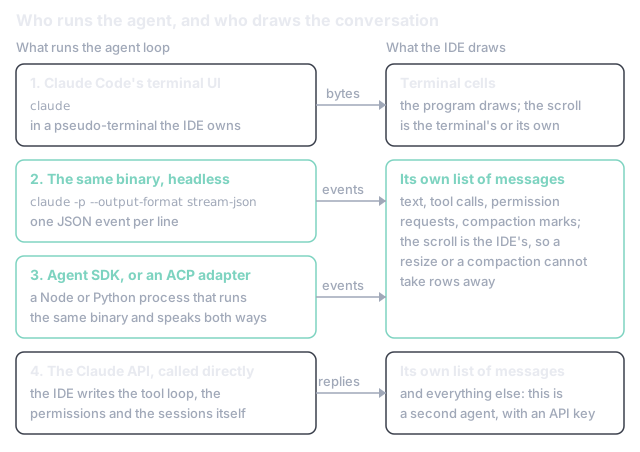
In short:
- 23 repeated rows and 5 lost rows came from two ordinary resizes of a 143-row conversation in the classic renderer; the fullscreen renderer's scroll stops at the last compaction after a resume (section 1).
- One JSON event per line is what the program prints when run headless, and the SDK's list
of messages has a
compact_boundarymark for the point where a terminal loses the scroll (section 2). - Two SDKs, no Rust one: sending messages in is documented for TypeScript and Python only (section 3).
- "Unless previously approved" is the condition on offering a Claude login in a product built on the SDK (section 7).
Claude Code has two ways of drawing in a terminal, and each loses the conversation in its own way. This section describes Claude Code 2.1.327 and Arkos IDE 0.8.50 as of Nov 17, 2026.
The fullscreen renderer "draws the interface on the terminal's alternate screen buffer, like
vim or htop, and only renders messages that are currently visible" [1]. The terminal's own
scrollback never receives the conversation, so the only scroll is the one Claude Code keeps in
memory. That scroll has an edge. Anthropic's page on the renderer says: "If you close a compacted
session and resume it, scrolling up stops at the Conversation compacted row, and your earlier
messages stay on disk in the transcript file" [1]. An IDE that resumes sessions after an update
or a restart does exactly that, close and resume, so a long session comes back with its history
cut at the last compaction. That is what happened in Arkos IDE: a session that was resumed after
an update, and compacted later, could be scrolled back to that compaction and no further.
The classic renderer writes down the terminal's main screen, so the terminal's scrollback holds
the conversation. Setting CLAUDE_CODE_DISABLE_ALTERNATE_SCREEN=1 selects it [1]. Its weakness is
a resize. Recorded through a pseudo-terminal, Claude Code 2.1.327 answers every change of size
the same way: it moves the cursor to the top left, erases every row of the screen and prints the
rows again for the new size. What it prints assumes a terminal that left the old rows where they
were. A terminal that re-wraps its rows on a resize, as Arkos IDE's does, has already pushed some
of them into the scrollback, and they arrive a second time.
Measured by recording a 143-row conversation's output at 80 by 24 and playing the bytes, with each resize, through Arkos IDE's terminal engine: narrowing the pane to 60 columns and back left 23 repeated rows in the scrollback; dragging a divider 20 columns and back, one column at a time, left 176; and shortening the pane to 14 rows and back lost 5 rows of the conversation outright, erased from the screen and never printed again. None of the three resizes sent a sequence that clears the scrollback. The rows were lost or doubled by two programs each assuming how the other treats a resize.
Both failures have one cause: the program that knows the conversation is not the program that owns the scroll. A terminal can be made to guess better, and that is worth doing. The other answer is to stop drawing a conversation as terminal cells at all, which needs Claude Code to hand over the conversation as data.
It does. claude -p runs a prompt without the terminal interface, and its documentation says:
"Use --output-format stream-json with --verbose and --include-partial-messages to receive
tokens as they're generated. Each line is a JSON object representing an event" [2]. The first
event, system/init, "reports session metadata including the model, tools, MCP servers, and
loaded plugins" [2]. Text arrives as stream_event lines carrying a text_delta, a failed
request shows as system/api_retry before the retry, and a refused tool call as a
permission_denied system message [2]. With --forward-subagent-text, a subagent's messages
come through marked with a parent_tool_use_id, "so you can reconstruct each subagent's
transcript" [3].
The event that matters for the scroll is in the TypeScript reference's list of message types:
SDKCompactBoundaryMessage, a system message with the subtype compact_boundary, whether the
compaction was manual or auto, and the token count before it [4]. Where a terminal loses
its history, a host that keeps its own list of messages receives a marker, and nothing it has
already drawn goes away. The SDK's documentation shows /compact itself sent as a prompt [5].
Most of what makes Claude Code more than a model comes along. Without the --bare flag,
"claude -p discovers and loads them as an interactive session would", "them" being hooks,
skills, custom commands, subagents, plugins, MCP servers, auto memory and CLAUDE.md [2]. A
session is continued with --resume and a session ID, and a run can be given its ID up front
with --session-id [2], [3]. What does not come along is the interface's own behaviour:
| The terminal interface does | Headless, the host must |
|---|---|
| Ask before a tool runs | Answer the request itself: in the default Manual mode "a call that needs approval is denied unless something approves it", a hook or a --permission-prompt-tool [2] |
| Run every built-in command | Expect a subset: "Built-in commands that only run in the terminal interface, such as /login, aren't available" [2] |
| Stop on Esc | Send SIGINT, which ends the turn; SIGTERM "leaves the turn that was in progress unfinished" [2] |
| Draw markdown, diffs, the status line, the prompt box | Draw all of it |
One sentence on that page is a warning for anyone building on a subscription login: "--bare
is the recommended mode for scripted and SDK calls, and will become the default for -p in a
future release" [2]. Bare mode "never reads OAuth credentials or the system keychain" [2]. A
host that depends on a plain -p picking up the user's login is depending on a default that
Anthropic has said will change.
That covers reading. A conversation also needs the other direction, and that is where the documentation stops being complete.
The flags for a two-way session exist. --input-format takes text or stream-json;
--replay-user-messages is described as "Re-emit user messages from stdin back on stdout for
acknowledgment"; and --max-turns describes a message "still queued" on a stream-json input,
so a process that stays open and takes one message after another is intended [3]. What a
message on stdin must look like is not on the CLI's pages. I could not find it stated anywhere
outside the SDK references, and I did not test a guessed format for this doc.
Anthropic's answer is the Agent SDK, which its overview calls "A library that runs the Claude
Code binary" [6], in TypeScript and Python. Its streaming input is described for this case: "Choose streaming input
for an application that holds a conversation with Claude, such as a chat interface. Use
streaming input to attach images to a message, interrupt a response, or switch the model or
permission mode while the session runs" [7]. Permission requests arrive at a canUseTool
callback, and interrupt() stops a response and keeps the session [4], [7].
For every other language the overview has one sentence: "To drive the same agent loop from a
language other than Python or TypeScript, run the CLI as a subprocess with the -p flag and
--output-format json" [6]. That is the one-shot form, a prompt in and a result out, not a
chat. The wire between the SDK and the binary is real and versioned, since the TypeScript
reference mentions a client that "drives the CLI's control protocol directly" and tells anyone
who will "parse the wire protocol yourself" how to treat a missing field [4]. It is described in
passing, not specified. So a Rust IDE has three ways to send a message:
| Route | What it adds to the app | What it rests on |
|---|---|---|
| A small Node helper on the TypeScript SDK | A Node runtime beside a Rust binary | The documented surface |
| An ACP client (section 5) | An adapter process, which is also Node | An open protocol, and the adapter's upkeep |
| Speak the SDK's wire format from Rust | Nothing | A format with no specification, which can change with any release |
Before weighing them, it helps to see the finished thing, because Anthropic ships one.
The extension "provides a native graphical interface for Claude Code", and it is not a second
implementation: "The extension bundles its own copy of the CLI (command-line interface) for the
chat panel" [8]. Its version number "is the Claude Code version it bundles", and "The extension
and CLI share the same conversation history", so a conversation started in the panel can be
continued with claude --resume in a terminal [8]. That is rows 2 and 3 of the figure: the same
engine, the same saved sessions, another front.
It is also a measure of how much of the terminal interface a native view gives up, even with
the author of both doing the work. The page's own comparison table gives the panel a "Subset" of
commands and skills where the CLI has "All", and no ! shell shortcut and no tab completion,
and says: "Some features are only available in the CLI. If you need a CLI-only feature, run
claude in VS Code's integrated terminal" [8]. The extension keeps a setting that swaps the
panel for the terminal interface [8]. A third-party view should expect the same shape: a panel
for the common path, and a terminal one keystroke away for the rest.
Anthropic can ship that panel because the SDK and the login are its own. An outside editor needs a contract it can build against, and one exists.
Zed put Claude Code in its editor on September 3, 2025, and did not write a Claude Code integration to do it: "We built an adapter that wraps Claude Code's SDK and translates its interactions into ACP's JSON RPC format. This adapter bridges between Claude Code and ACP's standardized interface, allowing Claude Code to run as an independent process while Zed provides the user interface" [9]. ACP, the Agent Client Protocol, is to coding agents roughly what the Language Server Protocol is to compilers: "Local agents run as sub-processes of the code editor, communicating via JSON-RPC over stdio" [10]. It carries the parts of an agent's interface an editor has to draw, such as diffs, and its text is Markdown by default [10].
For a Rust app the pieces are in place. The agent-client-protocol crate "provides
implementations of both sides" of the protocol, with a Client trait for the editor's side [11].
The adapter is open source under the Apache licence at agentclientprotocol/claude-agent-acp,
described as "Use Claude Agent SDK from any ACP client", and its last push was on the day this
doc was written [12]. An editor that speaks ACP gets other agents through the same client, which
is how Zed lists Codex, Gemini CLI and others beside Claude [13].
It does not remove the two costs of section 3 and section 4. The adapter is a Node program over the SDK, so the helper process is still there. And it inherits the SDK's gaps; Zed said so at launch: "many built-in slash commands are not yet supported by the SDK", with a request to "bring the SDK to parity with Claude Code or adopt ACP directly" [9]. I did not measure how much of that gap had closed by Nov 17, 2026.
All three routes run Claude Code. The route the question started from, calling Claude's API, does not.
Anthropic's own comparison is one row of a table. To "call the Claude API directly from your own code", use a client SDK, and "you write the tool loop yourself, or let the client SDK's beta tool runner drive it" [6]. Everything in section 2's "comes along" list is then the app's to build: the file and shell tools, permission rules, hooks, skills, MCP, subagents, compaction, saved sessions and resume. The result may be a good agent. It is not Claude Code with a different interface, and a user's Claude Code setup does not carry over to it.
This is the design Cursor documents for its own agent. Its docs describe an agent as instructions, tools and a model, and say "Cursor's agent orchestrates these components for each model we support, tuning instructions and tools specifically for every frontier model" [14]. The page does not say how each model is reached, so I am not claiming more than that: the agent is Cursor's own. That is a company whose product is the agent. An IDE whose purpose is to keep many Claude Code sessions alive wants the opposite: the least code between the user and the real thing. It also changes who pays, which is the next section's subject, since the API is billed by the token against an API key.
Claude Code takes a Claude subscription login or an API key. Whether an app with its own interface may run on the subscription login is answered by Anthropic's terms, in three passages. What follows quotes them as read on Nov 17, 2026 and then gives my reading, which is an interpretation and not legal advice.
The Agent SDK's overview: "Unless previously approved, Anthropic does not allow third party developers to offer claude.ai login or rate limits for their products, including agents built on the Claude Agent SDK" [6].
Claude Code's legal page, on authentication: the subscription's OAuth login "is designed to support ordinary use of Claude Code and other native Anthropic applications", developers "should use API key authentication", and "Anthropic does not permit third-party developers to offer Claude.ai login into their own applications, or to route requests through Free, Pro, Max, or Ultra plan credentials on behalf of their users. Moreover, developers may not collect, store, or intermediate Claude.ai credentials or session tokens" [15]. The same page then draws a line on the other side: this does not "prevent an end user from signing in to the unmodified Claude Code binary with their own Claude subscription, including where a platform hosts Claude Code" [15].
The same page, on products that run Claude Code: it "requires agreeing to our Commercial Terms of Service", "The Claude Code binary must not be modified", customers "may not remove, disable, or restrict any authentication method built into it", and "Each end user must authenticate with their own Anthropic API key, Claude subscription plan credentials, or 3P inference provider credential" [15]. Under those conditions it lets a product say it "runs Claude Code" in plain text, and bars the name from the product's own name, feature names or logo [15].
Beside these, the Consumer Terms bar accessing the services "through automated or non-human means, whether through a bot, script, or otherwise", with the exception "when you are accessing our Services via an Anthropic API Key or where we otherwise explicitly permit it" [16].
My reading, route by route:
- Hosting the terminal interface (row 1) is the case the second passage names: the user signs in to the unmodified binary, and the platform hosts it.
- Running the user's own installed binary headless (row 2) keeps the binary unmodified and the sign-in in Anthropic's own flow, and the app never sees a token. It is still the app, not the person, typing into the program, and nothing I found says whether that is "ordinary use". It is also the mode section 2 says will stop reading the login by default.
- Embedding the SDK (row 3, with or without ACP) is the case the first passage names, and it
needs prior approval to offer a Claude login. Zed's documentation describes its Claude agent as
one that "owns its own authentication and billing", where the user runs
/loginand authenticates "with an API key or with Claude Code where supported" [13]. - An API key is permitted on every route and is billed by the token, not by the plan.
The page ends with where to take the question: "For questions about permitted authentication methods for your use case, please contact sales" [15]. For a product that other people install, that is the step before any code.
A native view also needs the conversations a user already has, from before the view existed. Those are on disk.
Claude Code "stores transcripts as JSONL at ~/.claude/projects/<project>/<session-id>.jsonl"
and saves to them continuously [17]. The fullscreen page's sentence in section 1 is the evidence
that a compaction does not remove earlier messages from the file: they "stay on disk in the
transcript file" [1]. So the history a terminal cannot scroll to is there to be read.
The same page says not to: "The entry format is internal to Claude Code and changes between
versions, so scripts that parse these files directly can break on any release. To build on
session data, use /export or the script interfaces instead" [17]. The supported interfaces are
the ones in section 2, a headless run and the SDK, plus the transcript_path field a hook
receives [17]. Transcripts are also deleted after 30 days unless cleanupPeriodDays is changed
[17]. A host that wants the whole conversation, across every compaction and for as long as the
user wants it, has one dependable source: the events it received while the session ran, kept in
a store of its own.
For Arkos IDE, as of Nov 17, 2026, the order of work that follows from the eight sections is:
- Fix the terminal first. Hosting the terminal interface is the one route with no open question about terms and no missing feature. Run the classic renderer so the conversation is in the app's own scrollback, and make the terminal treat a resize the way Claude Code assumes, so section 1's rows are neither repeated nor lost.
- Ask Anthropic the section 7 question in writing before building a native view: may an app run the user's installed, unmodified binary headless, on the user's own subscription login, with its own interface?
- If the answer is yes, build the view as an ACP client, with the terminal pane kept as the fallback for every command the view does not cover, as the VS Code extension keeps its terminal mode. If the answer is an API key only, offer the view to users who have one and leave the terminal as the default.
Takeaway: an IDE does not need the Claude API to own the conversation. Claude Code already hands it over as events, and Anthropic's own extension is built that way. What an outside app lacks is not a technique but two answers: a specified way to send messages in, and permission to run that way on a subscription login.
What next
Open two Claude Code sessions side by side in Arkos IDE and drag the divider between them. As of Nov 17, 2026 each one is the terminal interface of section 1, drawn by Claude Code in a pane the app owns. Sections 2 to 5 are the other way to show the same session, and section 7 is the question that has to be answered before an app ships it. See what it does.
- Can a voice profile get AI-written posts past Substack's AI detector?
- How do you profile a browser game on an Android phone over Wi-Fi?
Part 4 of 4 in Arkos IDE notesPrevious: How Codex embeds its browser, and what a Rust IDE can copy
New research as it lands: the feed (RSS).
- [1]Anthropic, "Fullscreen rendering," Claude Code documentation. Accessed: Nov. 17, 2026. [Online]. Available: https://code.claude.com/docs/en/fullscreen
- [2]Anthropic, "Run Claude Code programmatically," Claude Code documentation. Accessed: Nov. 17, 2026. [Online]. Available: https://code.claude.com/docs/en/headless
- [3]Anthropic, "CLI reference," Claude Code documentation. Accessed: Nov. 17, 2026. [Online]. Available: https://code.claude.com/docs/en/cli-reference
- [4]Anthropic, "Agent SDK reference - TypeScript," Claude Code documentation. Accessed: Nov. 17, 2026. [Online]. Available: https://code.claude.com/docs/en/agent-sdk/typescript
- [5]Anthropic, "Extend agents with skills," Claude Code documentation. Accessed: Nov. 17, 2026. [Online]. Available: https://code.claude.com/docs/en/agent-sdk/slash-commands
- [6]Anthropic, "Agent SDK overview," Claude Code documentation. Accessed: Nov. 17, 2026. [Online]. Available: https://code.claude.com/docs/en/agent-sdk/overview
- [7]Anthropic, "Send messages to a running agent," Claude Code documentation. Accessed: Nov. 17, 2026. [Online]. Available: https://code.claude.com/docs/en/agent-sdk/streaming-vs-single-mode
- [8]Anthropic, "Use Claude Code in VS Code," Claude Code documentation. Accessed: Nov. 17, 2026. [Online]. Available: https://code.claude.com/docs/en/vs-code
- [9]M. Krey, "Claude Code: Now in Beta in Zed," Zed's Blog, Sep. 3, 2025. Accessed: Nov. 17, 2026. [Online]. Available: https://zed.dev/blog/claude-code-via-acp
- [10]Agent Client Protocol Authors, "Introduction," Agent Client Protocol documentation. Accessed: Nov. 17, 2026. [Online]. Available: https://agentclientprotocol.com/get-started/introduction
- [11]Agent Client Protocol Authors, "Rust," Agent Client Protocol documentation. Accessed: Nov. 17, 2026. [Online]. Available: https://agentclientprotocol.com/libraries/rust
- [12]Agent Client Protocol Authors, "claude-agent-acp," GitHub repository. Accessed: Nov. 17, 2026. [Online]. Available: https://github.com/agentclientprotocol/claude-agent-acp
- [13]Zed Industries, "External agents," Zed documentation. Accessed: Nov. 17, 2026. [Online]. Available: https://zed.dev/docs/ai/external-agents
- [14]Cursor, "Agent overview," Cursor documentation. Accessed: Nov. 17, 2026. [Online]. Available: https://cursor.com/docs/agent/overview
- [15]Anthropic, "Legal and compliance," Claude Code documentation. Accessed: Nov. 17, 2026. [Online]. Available: https://code.claude.com/docs/en/legal-and-compliance
- [16]Anthropic, "Consumer Terms of Service," effective Oct. 8, 2025. Accessed: Nov. 17, 2026. [Online]. Available: https://www.anthropic.com/legal/consumer-terms
- [17]Anthropic, "Manage sessions," Claude Code documentation. Accessed: Nov. 17, 2026. [Online]. Available: https://code.claude.com/docs/en/sessions