Oct 24, 2026
How Codex embeds its browser, and what a Rust IDE can copy
Codex's browser pane is an Electron webview guest of its own Chromium, driven over CDP by a plugin; a Rust IDE gets there with WKWebView, not by docking Chrome.
Part 3 of 3 in Arkos IDE notes · Previous: Update the IDE, keep the shells
Question: The Codex desktop app shows a browser in a pane beside the chat, and the agent can drive it. Arkos IDE, a Rust app on gpui with no browser engine of its own, wanted the same pane. How does Codex do it, and which parts can an app that is not Electron copy?
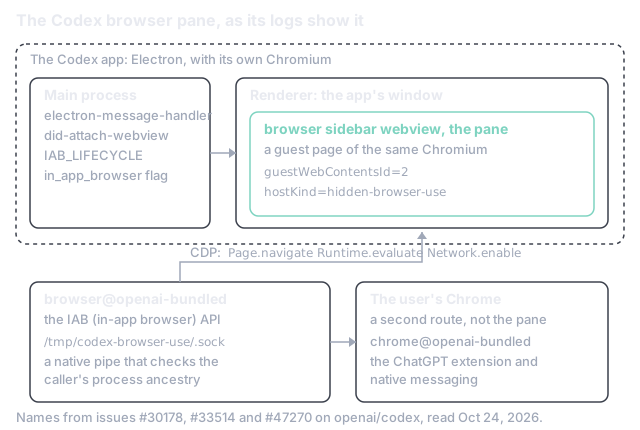
Short answer: Codex is an Electron app, so it ships a Chromium, and its browser pane is an Electron Electron's <webview> tag: a guest page hosted inside the app's own renderer, drawn as part of the window and running in a separate Chromium process. guest of that Chromium: a child view of the window, not a separate window kept in position. A bundled plugin drives the guest over the Chrome DevTools Protocol: the debugging interface a client uses to navigate a Chromium page, run script in it, read its network traffic and take screenshots. through a local socket, and the page runs in a profile of its own. None of that transfers to an app without Chromium. Arkos had docked a real Chrome window over a pane, and the seam showed; as of Oct 24, 2026, it is moving to Apple's web view: the Safari engine as an NSView an app places in its own window, with its own data store, script evaluation and snapshots, but no CDP., which gives the child view and the separate profile without shipping an engine, and loses CDP.
In short:
- Electron and Node.js is the stack, chosen so other operating systems could follow (section 1).
- A webview guest with
guestWebContentsId=2is the pane; a crash inside the bundledchrome.dllis the proof it is the app's own Chromium (section 2). - CDP over a Unix socket at
/tmp/codex-browser-use/.sockis how the agent drives it, with full CDP an opt-in since June 11, 2026 (section 3). - A separate profile, no existing tabs, sessions or extensions (section 4).
- Three Windows crash threads and a kill switch,
in_app_browser = false(section 6). - WKWebView is the engine Arkos chose, as of Oct 24, 2026, over CEF and over docking (section 7).
Simon Willison's write-up of the launch, on February 2, 2026, says it in one line: "The app is built with Electron and Node.js," and "They chose Electron so they could target other operating systems in the future" [1]. That one fact settles most of what follows: an Electron app carries a complete Chromium, so showing a web page inside its window is asking the engine it already runs for another page.
Where the app lives has moved since. OpenAI's Browser documentation, read on Oct 24, 2026, says
the built-in browser "isn't available in Codex CLI or the Codex IDE extension. Open the ChatGPT
desktop app to use the built-in browser" [2], and the Windows crash logs below name
ChatGPT.exe as the faulting application beside Codex.exe [3], [4]. The pane is the same one
whichever name is on the window.
OpenAI has not published the pane's design, but the app logs its own lifecycle, and users have
pasted those logs into bug reports. In issue #30178 the app logs renderer created browser sidebar webview and
runtime attached browser sidebar webview, a commenter describes a did-attach-webview listener
that "synchronously calls the internal browser-page attach function", and the crash lands in
"the bundled Chromium/Electron chrome.dll", with the Electron and Chromium build named as
150.0.7871.101 [3]. In issue #33514 the same log line carries hostKind=hidden-browser-use
and guestWebContentsId=2, the message handler is tagged [electron-message-handler], and the
reporter is careful to say which engine crashed: "Codex's Chromium guest WebView, not the
unrelated Edge WebView2 processes on the system" [4].
That is Electron's <webview> tag: a guest page hosted in the app's renderer, which "runs in a
separate process than your app" and is "essentially a custom element using shadow DOM to wrap an
iframe element inside it" [5]. It is laid out like any other element of the window, so it
resizes, hides and stacks with the rest of the interface for free; no window of another
application is involved. The same page carries a warning: "We currently recommend to not use the
webview tag and to consider alternatives, like iframe, a WebContentsView, or an architecture that
avoids embedded content altogether" [5]. Codex uses it anyway, and section 6 shows some of the
price.
The agent does not reach into the renderer directly. The logs name a bundled plugin,
browser@openai-bundled, with a separate chrome@openai-bundled backend for the user's real
Chrome [3], and an "IAB" (in-app browser) API: browser-use-iab-api logs
iab createTab mapped page to tab ... tabId=1 [4]. In issue #47270 the commands that time out
are CDP commands by name, Page.navigate, Runtime.evaluate and Network.enable, logged as
Timed out running CDP command "Page.navigate" for tab 1 [6]. The transport is local: on a Mac
with several users the backend failed with "listen permission denied on
/tmp/codex-browser-use/.sock", and a native pipe server turned a peer away with
reason=untrusted-process-ancestry [6]. The user's own Chrome is a second route with different
plumbing, through the ChatGPT Chrome extension and native messaging [6]. So "browser use" in
Codex is two backends behind one API, the guest page it owns and the Chrome it can only talk to.
What the agent may do over CDP grew in June. OpenAI's developer account announced "developer
mode for browser use in Chrome and the Codex in-app browser. Codex can use the Chrome DevTools
Protocol (CDP) to debug browser issues by profiling JavaScript performance and inspecting console
output, network traffic, and page state" [7]. A secondary write-up dates it to app version 26.609
on June 11, 2026, off by default and switched off for a workspace with
browser_use_full_cdp_access = false [8]. OpenAI's documentation has the switch under Settings,
Browser, "Enable full CDP access", warns that it "can expose sensitive browser internals", and
says admins disable it through requirements.toml [2]. Another report adds that the mode "runs
slowly, overloads under pressure, and sometimes needs a restart" [9].
OpenAI's documentation describes the built-in browser as "a shared view of websites and local web apps inside a chat" that "uses a separate profile from your regular browser and doesn't automatically access your existing tabs or sessions"; history is kept apart too, and the user can sign in by hand when a task needs an account [2]. The secondary write-ups agree: the in-app browser "does not support login flows", cookies, extensions or the user's usual Chrome profile [8], and after a sign-in through the pane, Codex keeps that session for later runs [10].
A docked real Chrome is the user's browser with every login and extension; the Codex pane is a clean room, the better default for a local development server, since nothing the agent does there touches the user's accounts.
The pane sits in a panel on the right, with Cmd+T for a new tab on macOS [2]. The user can
browse it by hand or hand it to the agent, and the hand-over is visible: one guide says "you'll
see a distinct agent cursor take over the mouse", and describes an "annotate" option where the
user selects an element, describes the problem, and the annotation "gets sent to the chat as an
instruction" [10]. Coverage of the April 16, 2026 update that introduced the pane says users
"can comment directly on web pages to give the agent specific instructions", and that OpenAI
planned to let Codex "fully control the browser beyond local web apps" [11]. A later write-up
sorts the pane into three modes, passive preview, comment mode and active browser use [12]; that
account is secondary and was not checked against the app. The logs add one detail: Failed to upsert Browser Use PiP content backend=iab tabID=1 [4], which suggests a picture-in-picture
surface for watching the agent's tab while another panel is in front.
The webview guest is where the app breaks. Issue #30178, labelled app, browser, bug and
windows-os, reports the whole app exiting during webview navigation: an access violation,
0xC0000005, reading address 0x558 in chrome.dll, "a null object/base dereference", shortly
after dom-ready, on versions from 26.623.3763.0 to 26.721.4979.0, x64 and arm64 [3]. Issue
#33514 reports the same end from a blank tab: the app's container is torn down about two seconds
after the guest's dom-ready, with no navigation at all [4]. Both threads give the same way out:
disable the bundled Browser plugin and set [features] in_app_browser = false [3], [4]. The
route layer fails on its own: issue #47270, filed in September 2026, reports "No ChatGPT browser
route is available for browser session", with neither the built-in browser nor Chrome found, on
Apple Silicon, Intel and Windows alike [6].
The point is where the failures sit: in attaching a guest renderer to the window, and in the socket and route plumbing between the agent and that renderer. Those are the two layers an Electron app gets by shipping Chromium, and the two another app must build or replace.
Arkos IDE is written in Rust on gpui, the interface library behind Zed, and has no web engine. An app in that position has three ways to a browser pane, and Arkos has tried two of them.
Ship Chromium. CEF, the Chromium Embedded Framework, is the Codex design without Electron: the app's own Chromium, a child view, CDP. It is also the footprint and the update cadence of a browser, carried by an IDE whose point is to be small. Arkos ruled it out in its first design.
Dock a real browser window. This is what Arkos shipped first. A browser tab was an empty rectangle, and the app used the macOS Accessibility API to keep a real Google Chrome window sized and positioned over it: twenty times a second while visible, moved off-screen when the tab was not active, raised again after every click elsewhere in the IDE. It worked, and it had every flaw of the idea. Chrome kept its own 80 px of tab strip and toolbar inside the pane. The IDE could draw nothing over the page, so a command palette could not cross it. Every click back into the IDE re-raised Chrome above it, and the flash showed. It needed the Accessibility permission. And it was somebody else's window following the IDE around the screen. The author of Arkos disliked it enough to drop it.
Use the engine the OS has. On macOS that is WKWebView, the Safari engine as an NSView an
app adds to its own window, and as of Oct 24, 2026 it is the direction Arkos is taking. It gives
what the Codex design gives at the level that matters for the user: the page is a child view of
the IDE's window, laid out by the IDE, resized with the pane, hidden with the tab, with the IDE's
own controls drawn around it. A WKWebsiteDataStore of the IDE's own is the separate profile of
section 4; loadFileURL(_:allowingReadAccessTo:) shows a local HTML file with its media, and
loadRequest a public page [13]. Nothing is shipped: WebKit is on every Mac, updated with the
system.
What it does not give is section 3. WKWebView has no CDP. An agent that wants to drive the pane
gets evaluateJavaScript(_:completionHandler:) for script and takeSnapshot(with:completionHandler:)
for a picture [13], and the IDE builds the rest, a command at a time. For Arkos that is a later
iteration; the first is the pane, and a command an agent can run to put a page in it. The other
loss is the engine: pages render in Safari's WebKit, not Chrome's Blink, the wrong engine for a
Chrome-only bug and the right one for a second opinion.
Takeaway: Codex's pane is three decisions stacked: a child view of the app's own window, a profile of its own, and CDP to drive it. The first two are properties of embedding any engine, and WKWebView gives both without shipping one. The third is Chromium's, and an app that will not carry Chromium writes its own smaller version of it.
Keep reading
Arkos IDE notes · 3 parts
- Bring the agents back after a reboot
- Update the IDE, keep the shells
- How Codex embeds its browser, and what a Rust IDE can copy
New research as it lands: the feed (RSS) or csarko.log.
- [1]S. Willison, "Introducing the Codex app," Simon Willison's Weblog, Feb. 2, 2026. Accessed: Oct. 24, 2026. [Online]. Available: https://simonwillison.net/2026/Feb/2/introducing-the-codex-app/
- [2]OpenAI, "Browser," ChatGPT documentation. Accessed: Oct. 24, 2026. [Online]. Available: https://learn.chatgpt.com/docs/browser
- [3]openai/codex, "Codex Desktop in-app Browser crashes the main app during webview navigation," GitHub issue #30178. Accessed: Oct. 24, 2026. [Online]. Available: https://github.com/openai/codex/issues/30178
- [4]openai/codex, "[Windows desktop] Creating an in-app Browser tab terminates Codex after about:blank WebView attachment," GitHub issue #33514. Accessed: Oct. 24, 2026. [Online]. Available: https://github.com/openai/codex/issues/33514
- [5]Electron Authors, "<webview> Tag," Electron documentation. Accessed: Oct. 24, 2026. [Online]. Available: https://www.electronjs.org/docs/latest/api/webview-tag
- [6]openai/codex, "[Desktop][Browser Use] No ChatGPT browser route prevents Chrome and built-in browser tab discovery," GitHub issue #47270. Accessed: Oct. 24, 2026. [Online]. Available: https://github.com/openai/codex/issues/47270
- [7]OpenAI Developers, "Introducing developer mode for browser use in Chrome and the Codex in-app browser," X post. Accessed: Oct. 24, 2026. [Online]. Available: https://x.com/OpenAIDevs/status/2065226355495895521
- [8]P. Pillitteri, "Codex now drives the browser with the Chrome DevTools Protocol," pasqualepillitteri.it. Accessed: Oct. 24, 2026. [Online]. Available: https://pasqualepillitteri.it/en/news/5088/codex-browser-chrome-devtools-protocol
- [9]TestingCatalog, "ICYMI: OpenAI released CDP support for browser use on Codex," testingcatalog.com. Accessed: Oct. 24, 2026. [Online]. Available: https://www.testingcatalog.com/icymi-openai-released-cdp-support-for-browser-use-on-codex/
- [10]MindStudio, "How to use Codex's browser agent and computer use features," mindstudio.ai. Accessed: Oct. 24, 2026. [Online]. Available: https://www.mindstudio.ai/blog/codex-browser-agent-computer-use
- [11]M. Bastian, "OpenAI turns Codex into an always-on coding agent that watches your screen," The Decoder, Apr. 16, 2026. Accessed: Oct. 24, 2026. [Online]. Available: https://the-decoder.com/openai-turns-codex-into-an-always-on-coding-agent-that-watches-your-screen/
- [12]P. Pillitteri, "Codex gets a native browser: OpenAI reshapes AI-assisted development (April 2026)," pasqualepillitteri.it, Apr. 29, 2026. Accessed: Oct. 24, 2026. [Online]. Available: https://pasqualepillitteri.it/en/news/1568/codex-native-browser-openai-april-2026
- [13]Apple, "WKWebView," Apple Developer Documentation. Accessed: Oct. 24, 2026. [Online]. Available: https://developer.apple.com/documentation/webkit/wkwebview