Nov 11, 2026
A dashboard API that ran out of memory, made fast for free
A 256 MiB Cloud Run API died under nine parallel queries; field masks, shared reads and saved answers made its dashboards fast, all on the free tier.
Question: The private admin dashboard for this site runs on one small Cloud Run service. Its Billing page began answering every card with an error after about 20 seconds. Why, and can every admin page load in about a second without leaving Google Cloud's free tier?
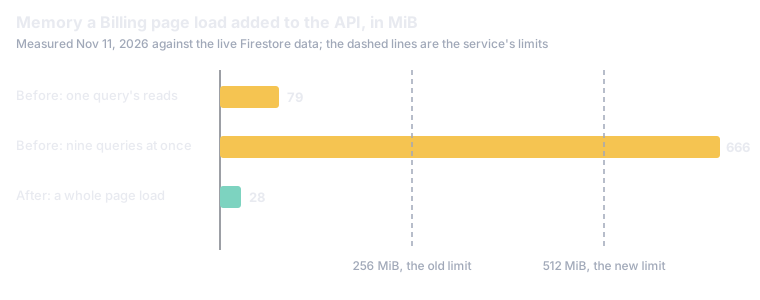
Short answer: As of Nov 11, 2026, the cause was memory, not speed: the page asks nine queries at once, and each one read about a month of daily One Firestore document a day holding everything the dashboard's slow sources reported that day. whole, at about 500 KB each, so one page load took 666 MiB and Cloud Run killed the 256 MiB instance mid-request. Reading only the fields each query needs, and sharing one read across the page, cut a load to 28 MiB. The Billing page then reads one precomputed document from Firestore per range, rewritten hourly, so it waits on no server start; the traffic dashboards draw each card from the answer the API last gave and cross-fade to the live one, because their data changes all day and precomputing every view hourly would have spent about half of the free Google's data warehouse; the site's visit logs and the Google Cloud bill are queried there. allowance on answers up to an hour old. Two older bugs turned out to share one cause: the newest snapshot document was often not the newest snapshot.
In numbers:
- 666 MiB for one Billing page load against a 256 MiB limit; the first kill was Nov 4, 2026, and by Nov 11 every card failed (section 1).
- 28 MiB a page load after field masks and one shared read, and 131 ms instead of 1.1 s to find the latest snapshot (section 2).
- 0.88 s to draw the Billing page from one of 4 documents of about 30 KB, rewritten hourly, with no request to the API (section 3).
- 1.7 s to draw every traffic card from its saved answer on a cold start, where the live answers took 6 to 8 s (section 6).
- 27 to 54 s loads, and a usage sync dropped every day, came from one assumption about which document is newest (section 4).
- $0 in new cost: every change stays inside the Cloud Run, Firestore, BigQuery and Cloud Scheduler free tiers (section 7).
The investigation, the fixes and this doc were done with Claude Code, from the service's own logs and measurements against its live data.
The admin site is a set of static pages on Firebase Hosting and one Node service on Cloud Run, csarko-admin, with one vCPU and 256 MiB of memory, scaling to zero when idle. A daily job writes a snapshot document to Firestore with everything that is slow to fetch, and the pages' queries read those snapshots plus a few live sources. The Billing page, the cloud-spend view, shows ten cards and asks for them at once.
The service's logs told the story without any guessing. Every one of the nine requests of a page load returned 503 after 18 to 23 seconds, all in the same second, and between them sat one line: Memory limit of 256 MiB exceeded with 265 MiB used. Cloud Run terminates an instance that goes over its limit [1], and the requests in flight on it go with it.
The memory went to snapshot reads. Until Oct 30, 2026 a snapshot was about 3 KB; that day the billing part landed, and from then on each one carried the day's cost rows from the cloud bills, mostly about 1,400 daily and 1,200 monthly rows from AWS Cost Explorer, about 500 KB a document. Two reads in every query loaded runs of them whole:
- The latest snapshot was found by reading the last 31 days of documents in id order and keeping the last one, because ordering by id descending would have needed a composite index.
- One provider's series read the last 60 days of documents to take one small field from each.
So each query decoded every large snapshot since Oct 30 twice, and nine ran at once. Measured from a laptop against the live database, one query's two reads added 79 MiB to the process and took 2.4 s; nine at once added 666 MiB and took 8.6 s. The page got slower every day as another large document joined both windows: the summary query took 2.5 s on Oct 30, 12 to 14 s on Nov 4 to 6, and on Nov 11 it never finished.
Firestore can return a chosen subset of each document's fields [2], so the fix is mostly to ask for less:
- The latest snapshot is found by reading the month's documents with an empty field mask, ids only, and then fetching the one newest document whole. That took 131 ms instead of 1,096 ms.
- Every read of a run of snapshots names its fields. The provider's series asks for its one field (398 ms instead of 1,158 ms), the monthly count of Cost Explorer calls for its two, and the twelve-week trends on the index for their four or five values.
- The page's queries share one read. The latest snapshot, the series window, the subscription entries and the three BigQuery jobs are read once and the promise is shared for 30 seconds, so a page load of ten queries makes one set of reads instead of ten.
Measured the same way, a whole page load added 28 MiB and took about a second with every cache cold. The limit went from 256 to 512 MiB as well, which is free at this traffic (section 7), but it is headroom: the change that matters is the 24-fold drop in what a load needs.
Takeaway: a document store that is cheap per read is not cheap per byte. When a document grows from kilobytes to half a megabyte, every query that reads a run of them whole becomes a memory problem long before it is a cost problem.
Fast queries still leave two waits on a cold load: Cloud Run starting an instance after idle, and BigQuery's fixed overhead of about a second a job. Keeping an instance always running removes the first, but it bills for every idle second, which this account's rule is never to do. The Billing page's data changes about once a day, and an hour's delay was acceptable, so the work moved off the request:
- A refresh route runs all ten queries for each of the four ranges (this month, last month, 90 days, 13 months) and writes one Firestore document a range,
financeViews/<range>, each answer stored as JSON text. As of Nov 11, 2026 the four are 29 to 32 KB each, well under Firestore's 1 MiB document limit [3], and a refresh takes about 3 s including a cold start. - Cloud Scheduler calls it at ten past every hour, after the 06:00 snapshot, with the same signed token the snapshot job uses. Entering the monthly subscription fee on the page also rewrites the views before it answers, so the reload shows it.
- The page reads its range's document straight from Firestore's REST API with the signed-in reader's Firebase ID token, which makes Firestore apply its security rules to the request [4]. The rules, the database's first, let the one allowlisted account read that collection and nothing else.
- Anything missing or stale falls back. A view older than 75 minutes, a refusal or an answer the document lacks is asked of the API as before, so the page never depends on the refresh having run.
Measured in the browser on Nov 11, 2026, the Billing page drew all ten cards 0.88 s after the navigation started, from one Firestore read of 91 ms, and made no request to the API at all.
Two older bugs had the same root. A second daily job, which reads one GPU service's usage report, writes its part into the day's document at 10:50 UTC, ten minutes before the snapshot fills the rest. So for those ten minutes, and all day on a day the snapshot fails, the newest document holds that one part and nothing else.
- The usage sync was dropped the day after it was made. The snapshot carried the Mac's latest Claude usage sync forward from the latest document, which was always that day's own, half-written one. The Oct 30 sync appeared in one snapshot and was gone from every one after it. Since the fix, the snapshot carries the newest earlier part, read from the previous 60 days by those fields alone.
- Health and Search took 27 to 54 s. They read the stored Lighthouse score and the indexing result from the latest document, and when it had none they ran PageSpeed and inspected the sitemap's 33 URLs live, 5 to 7 s each. That happened on Oct 30, Oct 31 and Nov 1, 2026, the days the snapshot ran late or not at all. Since the fix, they read the newest snapshot that holds each part, so a missing day costs nothing but age.
Both fixes have a test that writes the real order of events, the other job's half document first, and fails on the old code.
The Terraform module that owns the service ignores changes to its container image, because a separate deploy command owns the image [5]. That arrangement has a trap. A saved plan records the whole service as it was when the plan was made, image included, and an in-place update applies all of it. The plan for the memory change was saved before the new code was deployed, so applying it after the deploy started a new revision with the old image at the new memory. The live service quietly ran the code with the bug again, and the first sign was the new hourly job being refused, which the old code did not know. Redeploying the new image fixed it in a minute. A later rules-only change was planned with -target on the rules alone, and the rule since is to plan after any deploy, never before.
The other two dashboards, the site's traffic and the Arkos IDE app's usage, read BigQuery on every load and took 2 to 4 s at the median. Hourly views like Billing's looked like the obvious next step, until the bill was worked out. BigQuery's on-demand pricing bills at least 10 MB for every query and every table it reads, with the first 1 TiB a month free [6]. The dashboard's queries over the visit logs are small, so in the 14 days before the change, 572 of them were each billed 10 MB or nothing (a result from BigQuery's cache). A page load of the traffic dashboard runs about 6 jobs and one of the app dashboard about 5, so precomputing all four ranges of both, with the app dashboard's three audience filters, would run about 80 jobs an hour: up to about 0.55 TiB a month when the cache misses, over half the free tier, for answers up to an hour old. (A first estimate of twice that was made before the jobs were counted; counting them halved it.) Visits and app sessions change all day, where the bill changes once, so the deciding cost was freshness, not the tier.
So the traffic dashboards use the idea behind HTTP's stale-while-revalidate [7], applied per card:
- The API saves what it answers. Every dashboard answer without an error is also written to Firestore under an id built from the request: the app, the route and its parameters (
csarko.sh/admin/query/visits?days=7&tz=America/New_York). The browser builds the same id with its own copy of the function, and a test holds the two to one another. - A card draws the saved answer at once, marked "saved 30s ago" beside its title, then asks the API as it always did. When the live answer arrives and differs, the card cross-fades to it at an eased height, so nothing on the page jumps; when it is the same, only the mark fades.
- No new BigQuery jobs and no new scheduled job. The live call is the one the page always made; the saved answer is one Firestore read and one write per card, far inside Firestore's daily free quota of 50,000 reads and 20,000 writes [3].
Measured in the browser on Nov 11, 2026, the difference is the cold start. After 17 minutes with no request, when Cloud Run had stopped the instance, all ten cards of the traffic dashboard drew from their saved answers at 1.7 to 1.8 s after the navigation started, marked "saved 19 min ago", while the live answers came at 6.2 to 8.0 s and replaced them. Before the change, those 6 to 8 seconds were skeletons. With the instance warm, the live answers arrive at 1.0 to 1.4 s, about as soon as the saved ones, so only the slowest cards draw from the saved answer first. The floor is the sign-in: a saved answer is read with the reader's ID token, which takes about a second to restore.
- Cloud Run gives 180,000 vCPU-seconds, 360,000 GiB-seconds and 2 million requests a month free [8], and the service bills CPU only while a request is in flight [9]. Over October and November 2026 the project's Cloud Run services together used about 10,000 vCPU-seconds, so doubling this one's memory to 512 MiB stays far inside.
- Cloud Scheduler gives each billing account three free jobs [10]. The hourly refresh is the third; the traffic dashboards' design needs none.
- BigQuery gains about 2,900 small jobs a month from the hourly refresh, at most about 27 GiB at the 10 MB minimum, beside the 1 TiB free; the traffic dashboards add none.
- Firestore gains the four views, the saved answers and their reads, all well under the daily free quota.
What next
- How can a personal site track its traffic for free, without cookies?
- How do you price a tip jar from your real cloud bill, with no manual updates?
- How do you run unlimited email aliases on your own domain with no monthly fee?
Part 4 of 4 in A site on free tiersPrevious: Buy me tokens: tips priced from the cloud bill
New research as it lands: the feed (RSS).
- [1]Google, "Configure memory limits for services," Cloud Run documentation. Accessed: Nov. 11, 2026. [Online]. Available: https://docs.cloud.google.com/run/docs/configuring/services/memory-limits
- [2]Google, "StructuredQuery," Firestore REST API reference. Accessed: Nov. 11, 2026. [Online]. Available: https://docs.cloud.google.com/firestore/docs/reference/rest/v1/StructuredQuery
- [3]Google, "Usage and limits," Firestore documentation, Firebase. Accessed: Nov. 11, 2026. [Online]. Available: https://firebase.google.com/docs/firestore/quotas
- [4]Google, "Use the Cloud Firestore REST API," Firebase documentation. Accessed: Nov. 11, 2026. [Online]. Available: https://firebase.google.com/docs/firestore/use-rest-api
- [5]HashiCorp, "lifecycle meta-argument reference," Terraform documentation, v1.17.x. Accessed: Nov. 11, 2026. [Online]. Available: https://developer.hashicorp.com/terraform/language/meta-arguments/lifecycle
- [6]Google, "BigQuery pricing," Google Cloud. Accessed: Nov. 11, 2026. [Online]. Available: https://cloud.google.com/bigquery/pricing
- [7]M. Nottingham, "HTTP Cache-Control Extensions for Stale Content," RFC 5861, IETF, May 2010. Accessed: Nov. 11, 2026. [Online]. Available: https://www.rfc-editor.org/rfc/rfc5861
- [8]Google, "Cloud Run pricing," Google Cloud. Accessed: Nov. 11, 2026. [Online]. Available: https://cloud.google.com/run/pricing
- [9]Google, "Billing settings for services," Cloud Run documentation. Accessed: Nov. 11, 2026. [Online]. Available: https://docs.cloud.google.com/run/docs/configuring/billing-settings
- [10]Google, "Cloud Scheduler pricing," Google Cloud. Accessed: Nov. 11, 2026. [Online]. Available: https://cloud.google.com/scheduler/pricing