Sep 17, 2026 · Updated Oct 23, 2026
Git LFS on a cloud bucket, not GitHub's storage
Git LFS is not tied to GitHub. How its endpoint is discovered, three ways to put a cloud bucket behind it, and when to skip LFS entirely.
Question: a repository needs to carry large binary files: models, textures, audio, video. Git LFS is the standard answer, but does it have to mean GitHub's storage? Can a Google Cloud Storage bucket be used instead, or as additional storage alongside it?
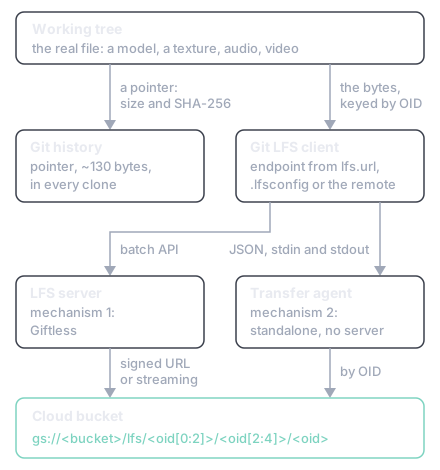
Short answer: a bucket can replace GitHub's storage, but not sit alongside it. Git LFS is not tied to GitHub: the client discovers its server endpoint, so pointing it at a bucket-backed LFS server, or at a standalone An ordinary program that Git LFS launches to move the bytes itself, talking to it over standard input and output. that needs no server at all, sends the bytes to the bucket. "Additional" is the one word that does not work: LFS resolves exactly one endpoint per remote and will never write an object to two backends in a single push. And for large files that are regenerable build output, the better answer is to skip LFS and pin the bytes from a A file the build already reads, recording what each asset is, where it came from and what it hashes to..
In short:
- A pointer of roughly 130 bytes is all git keeps; the real bytes go to an LFS server, keyed by their SHA-256 (section 2).
- Four settings move the endpoint:
lfs.url,remote.<name>.lfsurl, a committed.lfsconfigandlfs.standalonetransferagent;git lfs envprints the one in use (section 2). - Giftless puts Google Cloud Storage, S3, Azure Blob Storage or local disk behind an LFS server, though its published Google Cloud Storage example streams every byte through the server (section 3).
- One endpoint per remote: a second remote with its own LFS server is not a mirror, and keeping the two in step is a backup job you run (section 3).
- No server at all: a standalone agent speaks newline-delimited JSON with Git LFS and names each bucket object by its OID (section 4).
- Regenerable output skips LFS: the bytes in a bucket, a hash and a location in a manifest, and only text in git (section 6).
This is written for someone who has never used Git LFS. Sections 1 and 2 are the background; everything after that assumes them.
Git stores a complete snapshot of every version of every file it has ever been told about, and it never forgets. That is the property that makes git trustworthy, and it is also the trap.
Three consequences follow, and all three surprise people:
- Deleting a file reclaims nothing. The deletion is a new commit. Every earlier version is still in the object database, which is why a repository that once held a 2 GB video is permanently a repository that holds a 2 GB video.
- Every clone pays. Git history is distributed wholesale. A colleague cloning the repository in two years downloads the mistake made today.
- The only real fix rewrites history. Tools exist, but they change every commit hash from the mistake onward, which breaks every branch, tag and clone that already exists. Once the commit is pushed, this stops being a private cleanup and becomes everybody's problem.
Binary files make all three worse for a mechanical reason. Git stores text efficiently because successive versions differ in a few lines and compress well against each other. Two exports of the same model or texture usually share almost no bytes, so each version is stored at close to full size.
Git Large File Storage is the standard mitigation, and the idea is a single substitution.
2.1 The pointer
When a file matches a pattern in .gitattributes, git does not commit the file. It commits a small
text stub, roughly 130 bytes, naming the file's size and its SHA-256 hash. That stub is what lives
in history forever, and it compresses and diffs like any other text. The real bytes go to an LFS
server, keyed by that hash.
The hash is called the OID. It is worth noticing that the OID is the content's SHA-256, which makes LFS storage content-addressed: identical files are stored once, and verifying a download is just hashing it. Section 4.4 uses that property.
On checkout the client swaps the pointer back for the real file, so the working tree looks entirely normal.
2.2 The endpoint is discovered, not fixed
This is the part that answers the question, and it is not widely known.
Git LFS has no hardcoded notion of GitHub. By default the client takes the git remote's URL and
appends .git/info/lfs to it, so a GitHub remote resolves to a GitHub LFS endpoint by construction
rather than by decree. For SSH remotes it runs a helper called git-lfs-authenticate, which lets
the server hand back a different endpoint entirely [1].
Point the client elsewhere and the bytes go elsewhere. Every layer of that is overridable [1]:
| Setting | Effect |
|---|---|
lfs.url |
One LFS server for the repository, whatever the git remote is |
remote.<name>.lfsurl |
A different LFS server per remote |
.lfsconfig |
A file committed at the repository root, so every clone inherits the settings above |
lfs.standalonetransferagent |
Bypasses the server protocol completely; see section 4 |
git lfs env prints the endpoint the client has actually resolved [1], which is the first thing to run
when objects are not going where you expected.
2.3 Transfer adapters
Fetching an object is normally two steps. The client asks the LFS server's batch API where the object lives, and the server answers with a URL and headers. That URL need not be on the server: cloud-backed implementations typically return a signed URL, a time-limited link that lets the client talk straight to the bucket while holding no credentials of its own.
The component that performs the move is a transfer adapter. The built-in one speaks HTTP. Section 4 is about replacing it.
Giftless [2], from Datopian, is an open-source LFS server built for exactly this. It supports four storage backends: Google Cloud Storage, Amazon S3, Azure Blob Storage, and local disk [3]. The Google Cloud Storage backend needs a bucket and a service-account key, supplied either as a path to the JSON key file or base64-encoded in the configuration [3].
One detail matters more than the rest, and it is easy to miss. Bytes can move two ways:
- Streaming, where every byte passes through the server process on its way to the bucket. The server becomes a bandwidth bottleneck and a running cost.
- External, where the server only hands the client a signed URL and the client talks to the bucket directly. The server stays small and cheap.
The published Google Cloud Storage example uses the streaming mode [3]. The external interface exists in the storage layer, but confirm it for that backend specifically before sizing anything around it.
Point a repository at the result with lfs.url, or commit a .lfsconfig so everyone inherits it.
3.1 A different endpoint per remote
remote.<name>.lfsurl lets each remote resolve to its own LFS server, so a repository can push to
GitHub with GitHub's LFS and to a second remote with a bucket-backed one.
This is not mirroring. Git LFS uploads to the endpoint belonging to the remote being pushed to,
and to no other. Keeping two copies in step means running something like git lfs fetch --all
against one remote and pushing the objects to the other, on a schedule you own and monitor. Treat it
as a backup job that happens to use git plumbing, not as a feature.
This is the lightest mechanism, and it removes the server from the picture entirely.
A custom transfer agent is an ordinary executable. Git LFS launches it and talks to it over standard input and output in newline-delimited JSON [4]. The agent does the actual moving, so it can talk to a bucket, an NFS share, or anything else, using whatever library or command-line tool it likes.
Adding lfs.standalonetransferagent goes one step further: the client stops contacting any LFS API
server at all [4]. There is nothing to deploy, secure, monitor or pay for. The agent works out by itself
where each object lives.
4.1 Two meanings of "streaming"
"Streaming" names two different things, and conflating them produces a design that contradicts itself.
In section 3 it means a server proxying bytes through its own process, which is the thing this mechanism exists to avoid. Here it means the agent piping bytes straight between the working file and the bucket, rather than staging a whole second copy on local disk first. The second is what you want: no server, and no temporary duplicate of a large file.
4.2 The protocol: newline-delimited JSON in three stages
The exchange has three stages [4]. Git LFS sends the first message of each pair; the agent replies.
Initialisation, once per process:
{ "event": "init", "operation": "download", "remote": "origin", "concurrent": true, "concurrenttransfers": 3 }
The agent replies with an empty object on success, or with
{ "error": { "code": 32, "message": "..." } } on failure.
Transfers. For an upload, git-lfs supplies the local path to read:
{ "event": "upload", "oid": "...", "size": 346232, "path": "/path/to/file.png", "action": { "href": "...", "header": { } } }
For a download it supplies no path, because the agent chooses where to write:
{ "event": "download", "oid": "...", "size": 21245, "action": { "href": "...", "header": { } } }
In standalone mode there is no API server to produce that action, so the agent derives the
object's location from the OID itself. While a transfer runs it may report progress:
{ "event": "progress", "oid": "...", "bytesSoFar": 1234, "bytesSinceLast": 64 }
It signals the end with a completion message. An upload reports only the OID; a download must also report where it put the file, since git-lfs then moves it into place:
{ "event": "complete", "oid": "..." }
{ "event": "complete", "oid": "...", "path": "/path/to/file.png" }
{ "event": "complete", "oid": "...", "error": { "code": 2, "message": "..." } }
Termination. Git LFS sends { "event": "terminate" } and the agent exits.
4.3 Configuration
| Key | Meaning |
|---|---|
lfs.customtransfer.<name>.path |
The executable to run |
lfs.customtransfer.<name>.args |
Arguments passed to it |
lfs.customtransfer.<name>.concurrent |
Whether several may run in parallel |
lfs.customtransfer.<name>.direction |
upload, download or both |
lfs.standalonetransferagent |
Use this agent for all remotes, with no API server |
lfs.<url>.standalonetransferagent |
The same, for one remote URL |
4.4 The bucket layout falls out of the OID
Because the OID is the content's SHA-256, the natural object name is the OID itself, fanned out into two levels so no single prefix grows without bound:
gs://<bucket>/lfs/<oid[0:2]>/<oid[2:4]>/<oid>
Three useful properties come free. Identical content is stored once, whatever it is called in the working tree. Verifying a download is just hashing it and comparing. And an object can never be silently replaced by different content, because different content has a different name.
4.5 The agent owns auth, retries, concurrency and integrity
Removing the server does not remove the work; it relocates it. The agent now owns:
- Authentication. Application default credentials for a developer, and workload identity or a service-account key for continuous integration.
- Retries and resumption. A failed 200 MB upload should not restart from zero.
- Concurrency. Git LFS may run several agents at once, and they must not collide.
- Integrity. Verify the hash after download and fail loudly, rather than writing a truncated file into the working tree.
- Distribution. Every developer and every CI job needs the agent installed and configured. A
committed
.lfsconfigcarries the settings but not the binary.
These apply to all three mechanisms, and they are the reason section 6 exists.
- A clone now depends on infrastructure you operate. If the bucket, the credentials or the agent are unavailable, checkouts produce pointer files where the assets should be. A hosting provider's outage is somebody else's pager; yours is yours.
- The host's own surfaces stop resolving the files. The web interface, pull-request diffs and CI workflows will see pointer text instead of content. For a repository whose output is images, that is a real loss of review capability.
- Onboarding gets longer. Cloning is no longer enough, because everyone needs bucket access too.
- Deletion is still awkward. Moving the backing store to your own bucket does make objects deletable, which a hosted LFS service generally does not. But the pointer stays in history forever, so deleting the object turns an old commit into one that can no longer be checked out. That is a deliberate trade, not a cleanup.
Every mechanism above answers "how do I move large files through git". For a repository whose large files are build output, the better question is whether they should go through git at all.
The pattern: keep the bytes in a bucket, keep a hash and a retrieval location in a manifest file that the build already reads, and let git hold only the text that describes them.
6.1 Why this beats LFS for generated output
- The files are regenerable. Anything a pipeline can rebuild does not need archival storage with git's permanence guarantees. It needs a cache.
- Iteration is what costs, not size. Every rebuild that changes a byte adds a permanent new LFS version. A deterministic pipeline that gets rerun often is exactly the workload LFS handles worst.
- Storage becomes ordinary. A bucket object can be deleted, lifecycle-managed, moved to colder storage, or replaced. None of that is available once something is an LFS object referenced by a commit.
- A manifest is usually already there. Most asset pipelines keep a file recording what each asset is, where it came from and what it hashes to. Adding a retrieval location extends an existing pattern rather than inventing one.
6.2 The retrieval location is not the provenance URL
A manifest entry that records provenance already has a URL in it: the page the asset was downloaded or licensed from. A retrieval location is a different field, and overloading the first one with the second quietly destroys attribution. Provenance must keep pointing at the original author, while retrieval points at your bucket.
6.3 How the two schemes divide
They are not rivals, and the line between them is simple.
| The file must... | Use |
|---|---|
Arrive with a plain git clone, no second command, no extra credentials |
LFS, with the agent from section 4 |
| Be regenerable, large, or frequently rebuilt | The manifest scheme, fetched on demand |
Build output that is neither committed nor fetched, because a command regenerates it locally, needs no scheme at all. That is the cheapest answer whenever it is available.
- Staying on a hosted LFS service is usually right. It costs nothing to operate, and the included allowances are generous relative to what a repository of source code plus modest assets consumes. Moving is an operational dependency bought for a benefit you should be able to name.
- Reach for your own server when you need the LFS experience, where files arrive with a clone, but the volume or the deletion story makes a hosted service unworkable.
- Reach for the standalone agent when you want that same experience without operating an HTTP
service. It is the least infrastructure that still gives a working
git clone. - Reach for the manifest scheme when the files are generated, iterated on, and large. It is the only one of the four where storage behaves like storage, meaning you can delete things.
Keep reading
New research as it lands: the feed (RSS) or csarko.log.
08
Sources
Nothing described here has been built and run; it is a map of the options, not a report on a deployment.
- [1]Git LFS Authors, "Server Discovery," git-lfs, GitHub repository. Accessed: Oct. 10, 2026. [Online]. Available: https://github.com/git-lfs/git-lfs/blob/main/docs/api/server-discovery.md
- [2]Datopian, "giftless: a pluggable Git LFS server written in Python," GitHub repository. Accessed: Oct. 10, 2026. [Online]. Available: https://github.com/datopian/giftless
- [3]Datopian, "Storage Backends," Giftless Documentation. Accessed: Oct. 10, 2026. [Online]. Available: https://giftless.readthedocs.io/en/latest/storage-backends.html
- [4]Git LFS Authors, "Adding Custom Transfer Agents to LFS," git-lfs, GitHub repository. Accessed: Oct. 10, 2026. [Online]. Available: https://github.com/git-lfs/git-lfs/blob/main/docs/custom-transfers.md